闲得无聊弄的玩的,有兴趣的可以试试
API地址:https://dl-get.ytools.cc/
所有接口统一前缀:/api
接口地址: /api/latest-tag
请求方式: POST
{
"repo": "owner/repository", // 例如 "moshaoli688/miaospeed"
"pre": false // 是否包含预发布版本(可选,默认 false)
}{
"tag": "v2.3.1"
}接口地址: /api/releases
请求方式: POST
{
"repo": "owner/repository",
"pre": false
}{
"releases": [
{
"tag_name": "v2.3.1",
"name": "Release Title",
"prerelease": false,
"assets": [
{
"name": "example-linux-x64.tar.gz",
"browser_download_url": "https://github.com/xxx/xxx/releases/download/..."
}
]
}
]
}接口地址: /api/download-url
请求方式: POST
{
"repo": "owner/repository",
"tag": "v2.3.1", // 可选,默认使用最新版本
"os": "linux",
"arch": "amd64",
"cpu": "v3" // 可选,如 v1/v2/v3/avx2 等
}{
"tag": "v2.3.1",
"assets": [
{
"name": "example-linux-amd64-v3.tar.gz",
"url": "https://github.com/xxx/xxx/releases/download/..."
}
]
}
]]>[tabs]
[tab name="国内NTP服务器" active="true"]
| 名称 | 地址 |
|---|---|
| 国家授时中心 NTP 服务器 NTSC NTP Server | ntp.ntsc.ac.cn |
| 中国 NTP 快速授时服务 NTP ORG CN | cn.ntp.org.cn edu.ntp.org.cn |
| 国际 NTP 快速授时服务 Pool NTP ORG | cn.pool.ntp.org |
| 阿里云公共 NTP 服务器 Aliyun NTP Server | time.pool.aliyun.com time1.aliyun.com time2.aliyun.com time3.aliyun.com time4.aliyun.com time5.aliyun.com time6.aliyun.com time7.aliyun.com |
| 腾讯云公共 NTP 服务器 Tencent Cloud NTP Server | time1.cloud.tencent.com time2.cloud.tencent.com time3.cloud.tencent.com time4.cloud.tencent.com time5.cloud.tencent.com |
| 教育网(高校自建) EDU NTP Server | ntp.sjtu.edu.cn ntp.neu.edu.cn ntp.bupt.edu.cn ntp.shu.edu.cn ntp.tsinghua.edu.cn ntp.fudan.edu.cn |
| 中国科学院 NTP 服务器 CAS NTP Server | ntp.cas.cn |
[/tab]
[tab name="国际NTP服务器"]
| 名称 | 地址 |
|---|---|
| 国际 NTP 快速授时服务 Pool NTP ORG | pool.ntp.org 0.pool.ntp.org 1.pool.ntp.org 2.pool.ntp.org 3.pool.ntp.org asia.pool.ntp.org europe.pool.ntp.org north-america.pool.ntp.org |
| 谷歌公共 NTP 服务器 Google NTP Server | time1.google.com time2.google.com time3.google.com time4.google.com |
| 苹果公司公共 NTP 服务器 Apple NTP Server | time.apple.com time1.apple.com time2.apple.com time3.apple.com time4.apple.com time5.apple.com time6.apple.com time7.apple.com |
| 微软 Windows NTP 服务器 Microsoft Windows NTP Server | time.windows.com |
| 美国标准技术研究院 NTP 服务器 NIST NTP Server | time.nist.gov time-nw.nist.gov time-a.nist.gov time-b.nist.gov time-c.nist.gov time-d.nist.gov |
| 香港天文台公共 NTP 服务器 Hong Kong Observatory NTP Server | stdtime.gov.hk time.hko.hk |
| 亚马逊公共 NTP 服务器 Amazon NTP Server | time.aws.com |
| Cloudflare NTP 服务器 Cloudflare NTP Server | time.cloudflare.com |
| Facebook NTP 服务器 Facebook NTP Server | time.facebook.com |
| 德国物理技术研究所 PTB NTP Server | ptbtime1.ptb.de ptbtime2.ptb.de ptbtime3.ptb.de |
[/tab]
[/tabs]
NTP(Network Time Protocol,网络时间协议)用于在计算机系统之间进行时间同步。为了确保系统时钟准确,管理员可通过配置可靠的 NTP 服务节点,实现系统时间自动同步。
NTP服务器地址大全整理了国内及国外常用的公共NTP时间同步服务器IP地址列表,用户在选择NTP服务器地址时,需要根据自己的实际需求,并避免选择高危NTP服务器地址,以保证网络安全。
NTP 服务器(Network Time Protocol Server)是一种用于提供准确时间信息和实现时间同步的服务器。NTP 是一种网络协议,用于在计算机网络中同步各个设备的时间。
NTP 服务器通过连接到可靠的时间源(如原子钟、GPS 信号等)获取准确的时间,并将其传递给连接到服务器的客户端。NTP 服务器会对时间进行精确的校准和调整,以提供准确的时间信息。
// 禁止用户注册时发送电子邮件给管理员
add_filter( 'wp_new_user_notification_email_admin', '__return_false' );
// 禁止用户重置修改密码时发送电子邮件给管理员
add_filter( 'wp_password_change_notification_email', '__return_false' );
// 禁止用户注册时发送电子邮件给注册者
add_filter( 'wp_new_user_notification_email', '__return_false' );
// 禁止邮箱地址改变时发送邮件给注册者
add_filter( 'send_email_change_email', '__return_false' );
// 禁止更改密码时发送电子邮件给注册者
add_filter( 'send_password_change_email', '__return_false' );
以下代码是用来禁止WordPress在用户注册、重置密码、更改密码时发送电子邮件通知的。具体来说,它包括了五个过滤器,每个过滤器都有不同的功能。
wp_new_user_notification_email_admin
这个过滤器是用来禁止用户注册时向管理员发送电子邮件通知的。默认情况下,当有新用户注册时,WordPress会向网站管理员发送一封电子邮件通知,告知管理员有新用户注册了。使用这个过滤器后,当有新用户注册时,管理员将不会收到任何电子邮件通知。
// 禁止用户注册时发送电子邮件给管理员
add_filter( 'wp_new_user_notification_email_admin', '__return_false' );wp_password_change_notification_email
这个过滤器是用来禁止重置密码时向管理员发送电子邮件通知的。默认情况下,当用户重置密码时,WordPress会向网站管理员发送一封电子邮件通知,告知管理员有用户重置了密码。使用这个过滤器后,当用户重置密码时,管理员将不会收到任何电子邮件通知。
// 禁止重置密码时发送电子邮件给管理员
add_filter( 'wp_password_change_notification_email', '__return_false' );wp_new_user_notification_email
这个过滤器是用来禁止用户注册时向注册者发送电子邮件通知的。默认情况下,当用户注册新账户时,WordPress会向注册者发送一封电子邮件通知,告知用户账户已经创建成功。使用这个过滤器后,当用户注册新账户时,注册者将不会收到任何电子邮件通知。
// 禁止用户注册时发送电子邮件给注册者
add_filter( 'wp_new_user_notification_email', '__return_false' );send_email_change_email
这个过滤器是用来禁止邮箱地址改变时向注册者发送电子邮件通知的。默认情况下,当用户更改其注册邮箱的时候,WordPress会向新邮箱地址发送一封电子邮件通知,告知用户邮箱地址已经更改成功。使用这个过滤器后,当用户更改其注册邮箱时,新邮箱地址将不会收到任何电子邮件通知。
// 禁止邮箱地址改变时发送禁止给注册者
add_filter( 'send_email_change_email', '__return_false' );send_password_change_email
这个过滤器是用来禁止更改密码时向注册者发送电子邮件通知的。默认情况下,当用户更改其密码时,WordPress会向用户发送一封电子邮件通知,告知用户密码已经更改成功。使用这个过滤器后,当用户更改密码时,用户将不会收到任何电子邮件通知。
// 禁止更改密码时发送电子邮件给注册者
add_filter( 'send_password_change_email', '__return_false' );需要注意的是,禁用这些电子邮件通知可能会影响网站的功能。因此,在使用这段代码之前,请确保您了解其影响,并在进行修改之前备份您的网站数据。
]]>app/Jobs/StatServerJob.php
app/Jobs/StatUserJob.php这2个文件的代码是:
app/Jobs/StatServerJob.php
<?php
namespace App\Jobs;
use App\Models\StatServer;
use Illuminate\Bus\Queueable;
use Illuminate\Contracts\Queue\ShouldQueue;
use Illuminate\Foundation\Bus\Dispatchable;
use Illuminate\Queue\InteractsWithQueue;
use Illuminate\Queue\SerializesModels;
class StatServerJob implements ShouldQueue
{
use Dispatchable, InteractsWithQueue, Queueable, SerializesModels;
protected $u;
protected $d;
protected $server;
protected $protocol;
protected $recordType;
public $tries = 3;
public $timeout = 60;
/**
* Create a new job instance.
*
* @return void
*/
public function __construct($u, $d, $server, $protocol, $recordType = 'd')
{
$this->onQueue('stat');
$this->u = $u;
$this->d = $d;
$this->server = $server;
$this->protocol = $protocol;
$this->recordType = $recordType;
}
/**
* Execute the job.
*
* @return void
*/
public function handle()
{
$recordAt = strtotime(date('Y-m-d'));
if ($this->recordType === 'm') {
//
}
$data = StatServer::lockForUpdate()
->where('record_at', $recordAt)
->where('server_id', $this->server['id'])
->where('server_type', $this->protocol)
->first();
if ($data) {
try {
$data->update([
'u' => $data['u'] + $this->u,
'd' => $data['d'] + $this->d
]);
} catch (\Exception $e) {
abort(500, '节点统计数据更新失败');
}
} else {
if (!StatServer::create([
'server_id' => $this->server['id'],
'server_type' => $this->protocol,
'u' => $this->u,
'd' => $this->d,
'record_type' => $this->recordType,
'record_at' => $recordAt
])) {
abort(500, '节点统计数据创建失败');
}
}
}
}app/Jobs/StatUserJob.php
<?php
namespace App\Jobs;
use App\Models\StatServer;
use App\Models\StatUser;
use Illuminate\Bus\Queueable;
use Illuminate\Contracts\Queue\ShouldQueue;
use Illuminate\Foundation\Bus\Dispatchable;
use Illuminate\Queue\InteractsWithQueue;
use Illuminate\Queue\SerializesModels;
class StatUserJob implements ShouldQueue
{
use Dispatchable, InteractsWithQueue, Queueable, SerializesModels;
protected $u;
protected $d;
protected $userId;
protected $server;
protected $protocol;
protected $recordType;
public $tries = 3;
public $timeout = 60;
/**
* Create a new job instance.
*
* @return void
*/
public function __construct($u, $d, $userId, array $server, $protocol, $recordType = 'd')
{
$this->onQueue('stat');
$this->u = $u;
$this->d = $d;
$this->userId = $userId;
$this->server = $server;
$this->protocol = $protocol;
$this->recordType = $recordType;
}
/**
* Execute the job.
*
* @return void
*/
public function handle()
{
$recordAt = strtotime(date('Y-m-d'));
if ($this->recordType === 'm') {
//
}
$data = StatUser::where('record_at', $recordAt)
->where('server_rate', $this->server['rate'])
->where('user_id', $this->userId)
->first();
if ($data) {
try {
$data->update([
'u' => $data['u'] + ($this->u * $this->server['rate']),
'd' => $data['d'] + ($this->d * $this->server['rate'])
]);
} catch (\Exception $e) {
abort(500, '用户统计数据更新失败');
}
} else {
if (!StatUser::create([
'user_id' => $this->userId,
'server_rate' => $this->server['rate'],
'u' => $this->u,
'd' => $this->d,
'record_type' => $this->recordType,
'record_at' => $recordAt
])) {
abort(500, '用户统计数据创建失败');
}
}
}
}然后修改
app/Services/UserService.php
查找代码 TrafficFetchJob::dispatch($u, $d, $userId, $server, $protocol);
在下方增加
StatServerJob::dispatch($u, $d, $server, $protocol, 'd');
StatUserJob::dispatch($u, $d, $userId, $server, $protocol, 'd');保存 完工。。
]]>(1)本配置假设物理服务器内存为 16G,总表数量在300之内,中小型企业业务
(2)请根据实际情况作调整部分参数
(3)本人不对这些建议结果负相应责任 ,仅作参考
###########################################################################
## my.cnf for MySQL 8.0.x
## 本配置参考 https://imysql.com/my-cnf-wizard.html
## 注意:
## (1)本配置假设物理服务器内存为 16G,总表数量在300之内,中小型企业业务
## (2)请根据实际情况作调整部分参数
## (3)本人不对这些建议结果负相应责任 ,仅作参考
###########################################################################
###########################################################################
##客户端参数配置
###########################################################################
[client]
port = 3306
socket =/var/lib/mysql/mysqld.sock
[mysql]
#prompt="\u@mysqldb \R:\m:\s [\d]> "
#关闭自动补全sql命令功能
no-auto-rehash
###########################################################################
##服务端参数配置
###########################################################################
[mysqld]
port = 3306
datadir = /var/lib/mysql
socket = /var/lib/mysql/mysqld.sock
log-error = /var/lib/mysql/error.log
pid-file = /var/lib/mysql/mysqld.pid
#只能用IP地址检查客户端的登录,不用主机名
skip_name_resolve = 1
#若你的MySQL数据库主要运行在境外,请务必根据实际情况调整本参数
default_time_zone = "+8:00"
#数据库默认字符集, 主流字符集支持一些特殊表情符号(特殊表情符占用4个字节)
character-set-server = utf8mb4
#数据库字符集对应一些排序等规则,注意要和character-set-server对应
collation-server = utf8mb4_general_ci
#设置client连接mysql时的字符集,防止乱码
init_connect='SET NAMES utf8mb4'
#是否对sql语句大小写敏感,1表示不敏感
lower_case_table_names = 1
# 执行sql的模式,规定了sql的安全等级, 暂时屏蔽,my.cnf文件中配置报错
#sql_mode = STRICT_TRANS_TABLES,NO_AUTO_CREATE_USER,NO_ENGINE_SUBSTITUTION
#事务隔离级别,默认为可重复读,mysql默认可重复读级别(此级别下可能参数很多间隙锁,影响性能)
transaction_isolation = READ-COMMITTED
#TIMESTAMP如果没有显示声明NOT NULL,允许NULL值
explicit_defaults_for_timestamp = true
#它控制着mysqld进程能使用的最大文件描述(FD)符数量。
#需要注意的是这个变量的值并不一定是你设定的值,mysqld会在系统允许的情况下尽量获取更多的FD数量
open_files_limit = 65535
#最大连接数
max_connections = 300
#最大错误连接数
max_connect_errors = 600
#在MySQL暂时停止响应新请求之前的短时间内多少个请求可以被存在堆栈中
#官方建议 back_log = 50 + (max_connections / 5),封顶数为65535,默认值= max_connections
back_log = 110
# The number of open tables for all threads
# For example, for 200 concurrent running connections, specify a table cache size of at least 200 * N,
# where N is the maximum number of tables per join in any of the queries which you execute.
table_open_cache = 600
# The number of table definitions that can be stored in the definition cache
# MIN(400 + table_open_cache / 2, 2000)
table_definition_cache = 700
# 为了减少会话之间的争用,可以将opentables缓存划分为table_open_cache/table_open_cache_instances个小缓存
table_open_cache_instances = 64
# 每个线程的堆栈大小 如果线程堆栈太小,则会限制执行复杂SQL语句
thread_stack = 512K
# 禁止外部系统锁
external-locking = FALSE
#SQL数据包发送的大小,如果有BLOB对象建议修改成1G
max_allowed_packet = 128M
#order by 或group by 时用到
#建议先调整为4M,后期观察调整
sort_buffer_size = 4M
#inner left right join时用到
#建议先调整为4M,后期观察调整
join_buffer_size = 4M
# How many threads the server should cache for reuse.
# 如果您的服务器每秒达到数百个连接,则通常应将thread_cache_size设置得足够高,以便大多数新连接使用缓存线程
# default value = 8 + ( max_connections / 100) 上限为100
thread_cache_size = 20
#MySQL连接闲置超过一定时间后(单位:秒)将会被强行关闭
#MySQL默认的wait_timeout 值为8个小时, interactive_timeout参数需要同时配置才能生效
interactive_timeout = 1800
wait_timeout = 1800
#Metadata Lock最大时长(秒), 一般用于控制 alter操作的最大时长sine mysql5.6
#执行 DML操作时除了增加innodb事务锁外还增加Metadata Lock,其他alter(DDL)session将阻塞
lock_wait_timeout = 3600
#内部内存临时表的最大值。
#比如大数据量的group by ,order by时可能用到临时表,
#超过了这个值将写入磁盘,系统IO压力增大
tmp_table_size = 64M
max_heap_table_size = 64M
#--###########################-- 慢SQL日志记录 开始 --##########################################
#是否启用慢查询日志,1为启用,0为禁用
slow_query_log = 1
#记录系统时区
log_timestamps = SYSTEM
#指定慢查询日志文件的路径和名字
slow_query_log_file = /var/lib/mysql/slow.log
#慢查询执行的秒数,必须达到此值可被记录
long_query_time = 5
#将没有使用索引的语句记录到慢查询日志
log_queries_not_using_indexes = 0
#设定每分钟记录到日志的未使用索引的语句数目,超过这个数目后只记录语句数量和花费的总时间
log_throttle_queries_not_using_indexes = 60
#对于查询扫描行数小于此参数的SQL,将不会记录到慢查询日志中
min_examined_row_limit = 5000
#记录执行缓慢的管理SQL,如alter table,analyze table, check table, create index, drop index, optimize table, repair table等。
log_slow_admin_statements = 0
#作为从库时生效, 从库复制中如何有慢sql也将被记录
#对于ROW格式binlog,不管执行时间有没有超过阈值,都不会写入到从库的慢查询日志
log_slow_slave_statements = 1
#--###########################-- 慢SQL日志记录 结束 --##########################################
#--###########################-- Bin-Log设置 开始 --############################################
server-id = 110
#开启bin log 功能
log-bin=mysql-bin
#binlog 记录内容的方式,记录被操作的每一行
binlog_format = ROW
#对于binlog_format = ROW模式时,FULL模式可以用于误操作后的flashBack。
#如果设置为MINIMAL,则会减少记录日志的内容,只记录受影响的列,但对于部分update无法flashBack
binlog_row_image = FULL
#bin log日志保存的天数
#如果 binlog_expire_logs_seconds 选项也存在则 expire_logs_days 选项无效
#expire_logs_days 已经被标注为过期参数
#expire_logs_days = 7
binlog_expire_logs_seconds = 1209600
#master status and connection information输出到表mysql.slave_master_info中
master_info_repository = TABLE
#the slave's position in the relay logs输出到表mysql.slave_relay_log_info中
relay_log_info_repository = TABLE
#作为从库时生效, 想进行级联复制,则需要此参数
log_slave_updates
#作为从库时生效, 中继日志relay-log可以自我修复
relay_log_recovery = 1
#作为从库时生效, 主从复制时忽略的错误
#如果在备份过程中执行ddl操作,从机需要从主机的备份恢复时可能会异常,从而导致从机同步数据失败
#如果对数据完整性要求不是很严格,那么这个选项确实可以减轻维护的成本
slave_skip_errors = ddl_exist_errors
#####RedoLog日志 和 binlog日志的写磁盘频率设置 BEGIN ###################################
# RedoLog日志(用于增删改事务操作) + binlog日志(用于归档,主从复制)
# 为什么会有两份日志呢?
# 因为最开始MySQL没有 InnoDB 引擎,自带MyISAM引擎没有 crash-safe能力,binlog日志只用于归档
# InnoDB 引擎是另一个公司以插件形式引入MySQL的,采用RedoLog日志来实现 crash-safe 能力
# redo log 的写入(即事务操作)拆成两阶段提交(2PC):prepare阶段 和 commit阶段
#(事务步骤1) 执行commit命令,InnoDB redo log 写盘,然后告知Mysql执行器:[你可以写binlog了,且一并提交事务],事务进入 prepare 状态
#(事务步骤2) 如果前面 prepare 成功,Mysql执行器生成 binlog 并且将binlog日志写盘
#(事务步骤3) 如果binlog写盘成功,Mysql执行器一并调用InnoDB引擎的提交事务接口,事务进入 commit 状态,操作完成,事务结束
#参数设置成 1,每次事务都直接持久化到磁盘
#参数设置成 0,mysqld进程的崩溃会导致上一秒钟所有事务数据的丢失。
#参数设置成 2,只有在操作系统崩溃或者系统掉电的情况下,上一秒钟所有事务数据才可能丢失。
#即便都设置为1,服务崩溃或者服务器主机crash,Mysql也可能丢失但最多一个事务
#控制 redolog 写磁盘频率 默认为1
innodb_flush_log_at_trx_commit = 1
#控制 binlog 写磁盘频率
sync_binlog = 1
#####RedoLog日志 和 binlog日志的写磁盘频率设置 END #####################################
#一般数据库中没什么大的事务,设成1~2M,默认32kb
binlog_cache_size = 4M
#binlog 能够使用的最大cache 内存大小
max_binlog_cache_size = 2G
#单个binlog 文件大小 默认值是1GB
max_binlog_size = 1G
#开启GTID复制模式
gtid_mode = on
#强制gtid一致性,开启后对于create table ... select ...或 CREATE TEMPORARY TABLE 将不被支持
enforce_gtid_consistency = 1
#解决部分无主键表导致的从库复制延迟问题
#其基本思路是对于在一个ROWS EVENT中的所有前镜像收集起来,
#然后在一次扫描全表时,判断HASH中的每一条记录进行更新
#该参数已经被标注为过期参数
#slave-rows-search-algorithms = 'INDEX_SCAN,HASH_SCAN'
# default value is CRC32
#binlog_checksum = 1
# default value is ON
#relay-log-purge = 1
#--###########################-- Bin-Log设置 结束 --##########################################
#--###########################-- 可能用到的MyISAM性能设置 开始 --#############################
#对MyISAM表起作用,但是内部的临时磁盘表是MyISAM表,也要使用该值。
#可以使用检查状态值 created_tmp_disk_tables 得知详情
key_buffer_size = 15M
#对MyISAM表起作用,但是内部的临时磁盘表是MyISAM表,也要使用该值,
#例如大表order by、缓存嵌套查询、大容量插入分区。
read_buffer_size = 8M
#对MyISAM表起作用 读取优化
read_rnd_buffer_size = 4M
#对MyISAM表起作用 插入优化
bulk_insert_buffer_size = 64M
#--###########################-- 可能用到的MyISAM性能设置 开始 --################################
#--###########################-- innodb性能设置 开始 --##########################################
# Defines the maximum number of threads permitted inside of InnoDB.
# A value of 0 (the default) is interpreted as infinite concurrency (no limit)
innodb_thread_concurrency = 0
#一般设置物理存储的 60% ~ 70%
innodb_buffer_pool_size = 8G
#当缓冲池大小大于1GB时,将innodb_buffer_pool_instances设置为大于1的值,可以提高繁忙服务器的可伸缩性
innodb_buffer_pool_instances = 4
#默认启用。指定在MySQL服务器启动时,InnoDB缓冲池通过加载之前保存的相同页面自动预热。 通常与innodb_buffer_pool_dump_at_shutdown结合使用
innodb_buffer_pool_load_at_startup = 1
#默认启用。指定在MySQL服务器关闭时是否记录在InnoDB缓冲池中缓存的页面,以便在下次重新启动时缩短预热过程
innodb_buffer_pool_dump_at_shutdown = 1
# Defines the name, size, and attributes of InnoDB system tablespace data files
innodb_data_file_path = ibdata1:1G:autoextend
#InnoDB用于写入磁盘日志文件的缓冲区大小(以字节为单位)。默认值为16MB
innodb_log_buffer_size = 32M
#InnoDB日志文件组数量
innodb_log_files_in_group = 3
#InnoDB日志文件组中每一个文件的大小
innodb_log_file_size = 2G
#是否开启在线回收(收缩)undo log日志文件,支持动态设置,默认开启
innodb_undo_log_truncate = 1
#当超过这个阀值(默认是1G),会触发truncate回收(收缩)动作,truncate后空间缩小到10M
innodb_max_undo_log_size = 4G
#The path where InnoDB creates undo tablespaces
#没有配置则在数据文件目录下
#innodb_undo_directory = /var/lib/mysql/undolog
#用于设定创建的undo表空间的个数
#已经弃用了,只能手动添加undo表空间
#The innodb_undo_tablespaces variable is deprecated and is no longer configurable as of MySQL 8.0.14
#innodb_undo_tablespaces = 95
#提高刷新脏页数量和合并插入数量,改善磁盘I/O处理能力
#根据您的服务器IOPS能力适当调整
#一般配普通SSD盘的话,可以调整到 10000 - 20000
#配置高端PCIe SSD卡的话,则可以调整的更高,比如 50000 - 80000
innodb_io_capacity = 4000
innodb_io_capacity_max = 8000
#如果打开参数innodb_flush_sync, checkpoint时,flush操作将由page cleaner线程来完成,此时page cleaner会忽略io capacity的限制,进入激烈刷脏
innodb_flush_sync = 0
innodb_flush_neighbors = 0
#CPU多核处理能力设置,假设CPU是4颗8核的,设置如下
#读多,写少可以设成 2:6的比例
innodb_write_io_threads = 8
innodb_read_io_threads = 8
innodb_purge_threads = 4
innodb_page_cleaners = 4
innodb_open_files = 65535
innodb_max_dirty_pages_pct = 50
#该参数针对unix、linux,window上直接注释该参数.默认值为 NULL
#O_DIRECT减少操作系统级别VFS的缓存和Innodb本身的buffer缓存之间的冲突
innodb_flush_method = O_DIRECT
innodb_lru_scan_depth = 4000
innodb_checksum_algorithm = crc32
#为了获取被锁定的资源最大等待时间,默认50秒,超过该时间会报如下错误:
# ERROR 1205 (HY000): Lock wait timeout exceeded; try restarting transaction
innodb_lock_wait_timeout = 20
#默认OFF,如果事务因为加锁超时,会回滚上一条语句执行的操作。如果设置ON,则整个事务都会回滚
innodb_rollback_on_timeout = 1
#强所有发生的死锁错误信息记录到 error.log中,之前通过命令行只能查看最近一次死锁信息
innodb_print_all_deadlocks = 1
#在创建InnoDB索引时用于指定对数据排序的排序缓冲区的大小
innodb_sort_buffer_size = 67108864
#控制着在向有auto_increment 列的表插入数据时,相关锁的行为,默认为2
#0:traditonal (每次都会产生表锁)
#1:consecutive (mysql的默认模式,会产生一个轻量锁,simple insert会获得批量的锁,保证连续插入)
#2:interleaved (不会锁表,来一个处理一个,并发最高)
innodb_autoinc_lock_mode = 1
#表示每个表都有自已独立的表空间
innodb_file_per_table = 1
#指定Online DDL执行期间产生临时日志文件的最大大小,单位字节,默认大小为128MB。
#日志文件记录的是表在DDL期间的数据插入、更新和删除信息(DML操作),一旦日志文件超过该参数指定值时,
#DDL执行就会失败并回滚所有未提交的当前DML操作,所以,当执行DDL期间有大量DML操作时可以提高该参数值,
#但同时也会增加DDL执行完成时应用日志时锁定表的时间
innodb_online_alter_log_max_size = 4G
#--###########################-- innodb性能设置 结束 --##########################################
[mysqldump]
quick
max_allowed_packet = 128M
转自:https://blog.csdn.net/gzt19881123/article/details/109511245
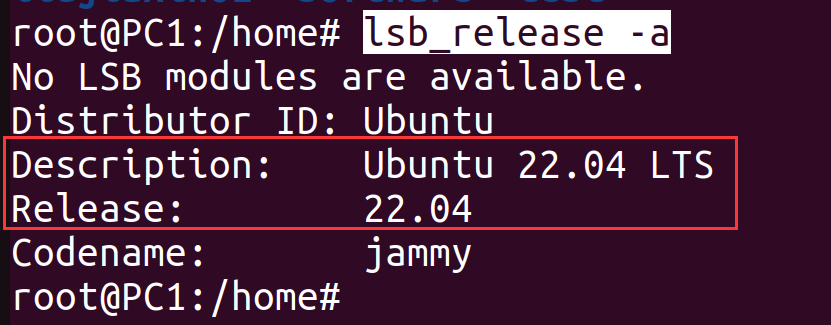
]]>lsb_release -a
ubuntu 22.04.
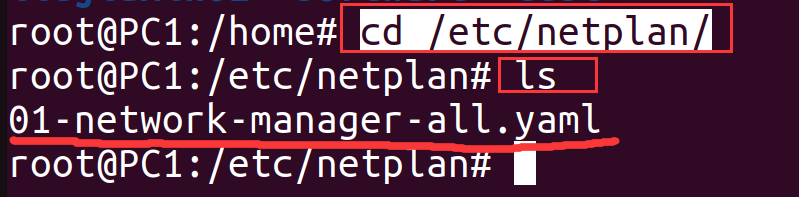
2、进入/etc/netplan/目录,列出该目录下的内容
cd /etc/netplan/
ls
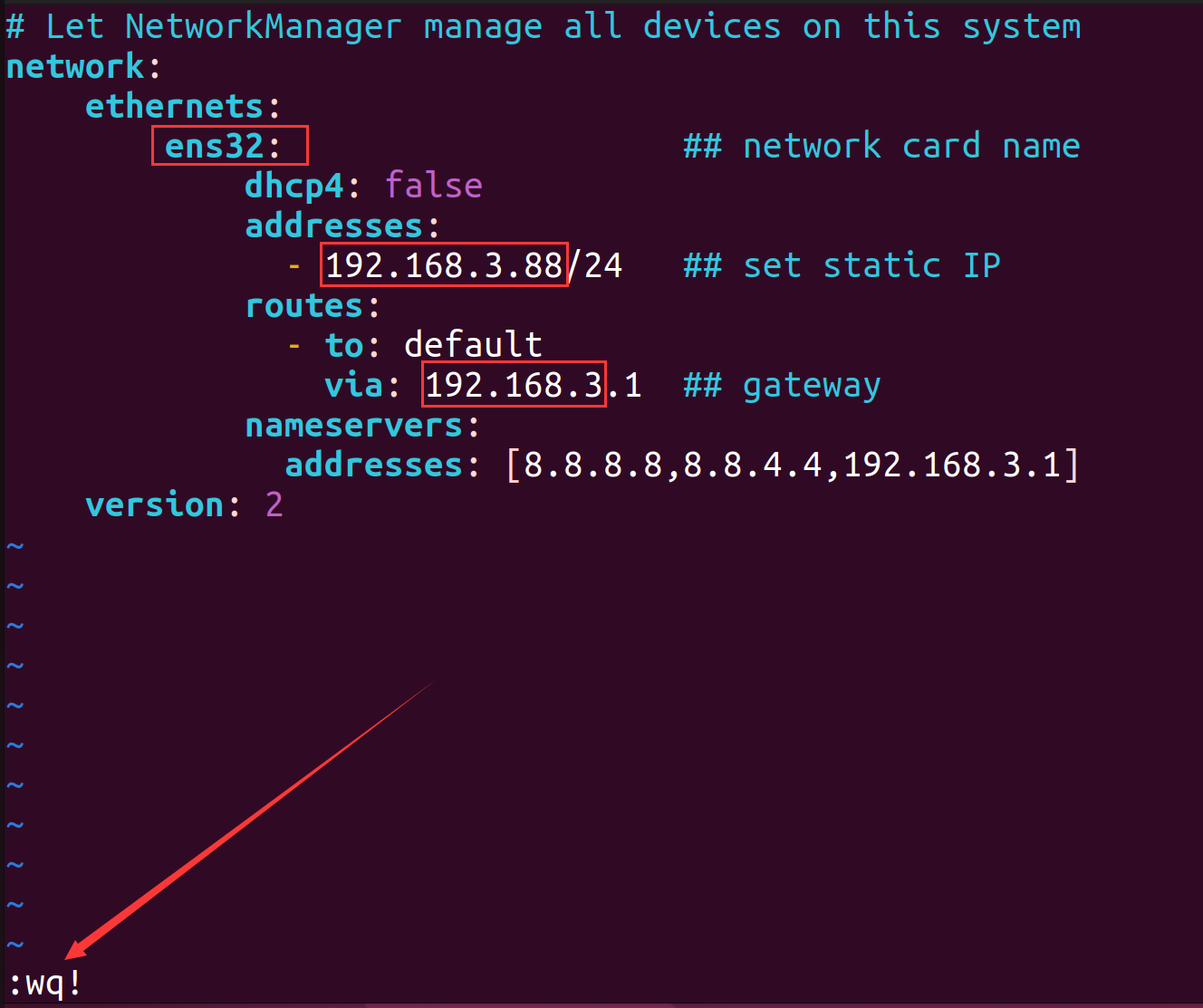
3、利用vim编辑器打开xxx.yaml文件,进行编辑:
vim 01-network-manager-all.yaml内容如下:(修改网卡名称、IP、网关后保存退出)
# Let NetworkManager manage all devices on this system
network:
ethernets:
ens32: ## network card name
dhcp4: false
addresses:
- 192.168.3.88/24 ## set static IP
routes:
- to: default
via: 192.168.3.1 ## gateway
nameservers:
addresses: [8.8.8.8,8.8.4.4,192.168.3.1]
version: 2
格式的缩进很容易出错, 可以直接复制以上模板,只修改网卡名称、IP和网关即可。
4、开启 systemd-networkd服务(可选)
sudo systemctl start systemd-networkd
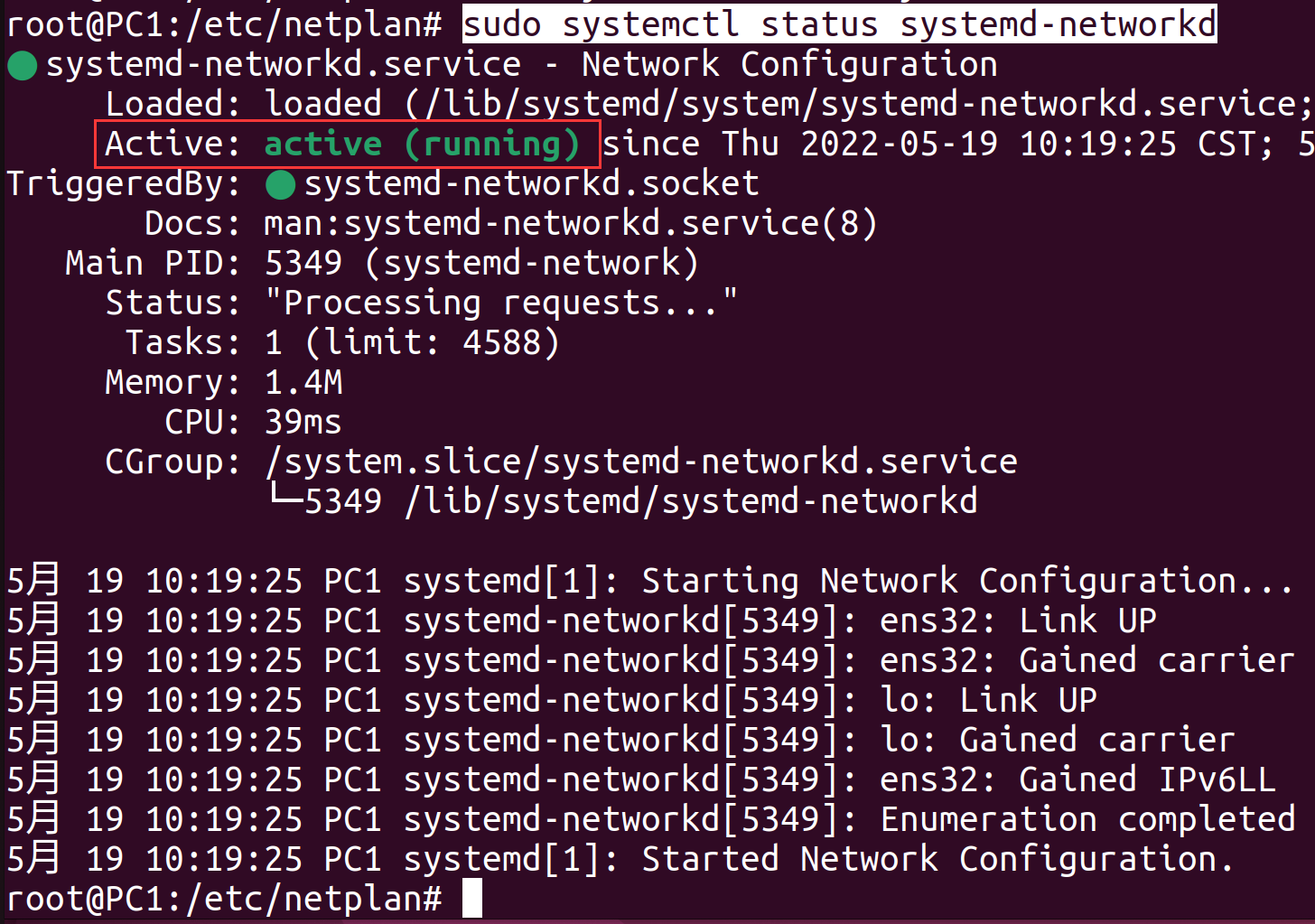
5、查看systemd-networkd服务状态(可选)
sudo systemctl status systemd-networkd
5、查看systemd-networkd服务状态(可选)
sudo systemctl status systemd-networkd
说明systemd-networkd服务已经启动。
6、重启网络服务
sudo netplan apply
没有报错说明格式正确。
7、查看设定的IP是否生效
ifconfig | head -n 3
设定的IP已生效。
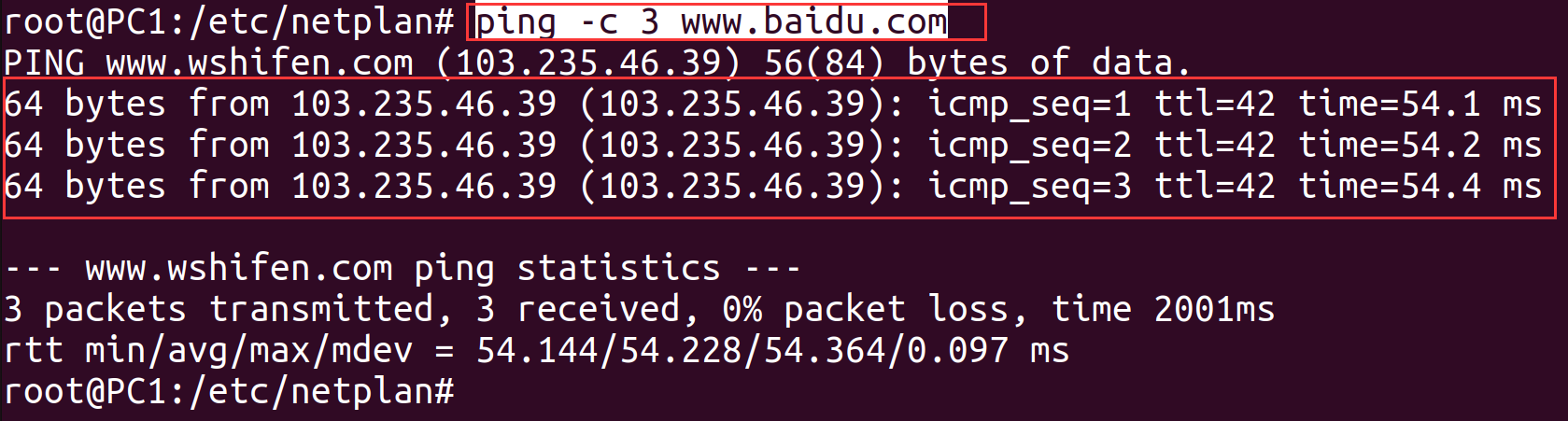
8、测试网络连接是否正常
ping -c 3 www.baidu.com
说明网络连接正常。
参考:
https://linuxconfig.org/netplan-network-configuration-tutorial-for-beginners
https://blog.csdn.net/cal_room2032/article/details/124629068
*bold \*text*
_italic \*text_
__underline__
~strikethrough~
*bold _italic bold ~italic bold strikethrough~ __underline italic bold___ bold*
[inline URL](http://www.example.com/)
[inline mention of a user](tg://user?id=123456789)
`inline fixed-width code`
```
pre-formatted fixed-width code block
```
```python
pre-formatted fixed-width code block written in the Python programming language
```<b>bold</b>, <strong>bold</strong>
<i>italic</i>, <em>italic</em>
<u>underline</u>, <ins>underline</ins>
<s>strikethrough</s>, <strike>strikethrough</strike>, <del>strikethrough</del>
<b>bold <i>italic bold <s>italic bold strikethrough</s> <u>underline italic bold</u></i> bold</b>
<a href="http://www.example.com/">inline URL</a>
<a href="tg://user?id=123456789">inline mention of a user</a>
<code>inline fixed-width code</code>
<pre>pre-formatted fixed-width code block</pre>
<pre><code class="language-python">pre-formatted fixed-width code block written in the Python programming language</code></pre>*bold text*
_italic text_
[inline URL](http://www.example.com/)
[inline mention of a user](tg://user?id=123456789)
`inline fixed-width code`
```
pre-formatted fixed-width code block
```
```python
pre-formatted fixed-width code block written in the Python programming language
```
]]>只允许docker-library/official-images通过加速器
控制允许通过加速器的路径,自己用自己配置map选项即可
作为 registry.k8s.io、 k8s.gcr.io、 gcr.io 的镜像缓存,
只需要把 REGISTRY_PROXY_REMOTEURL 分别换成换成 registry.k8s.io、 k8s.gcr.io、 gcr.io、 quay.io等即可
version: "3"
services:
docker-registry:
image: registry:2
container_name: registry-01
restart: always
expose:
- "5000"
volumes:
- /data/tls:/tls
# - /data/data-box/docker-registry:/data # 数据目录
environment:
- REGISTRY_PROXY_REMOTEURL=https://registry-1.docker.io
# - REGISTRY_PROXY_USERNAME=username
# - REGISTRY_PROXY_PASSWORD=password
- REGISTRY_HTTP_TLS_CERTIFICATE=/tls/wildcard.xiaoshuogeng.com.fullchain.pem
- REGISTRY_HTTP_TLS_KEY=/tls/wildcard.xiaoshuogeng.com.key.pem
- REGISTRY_STORAGE_FILESYSTEM_ROOTDIRECTORY=/data
nginx-proxy:
image: nginx:alpine
container_name: nginx-proxy-docker-registry
restart: always
depends_on:
- docker-registry
ports:
- "5000:443"
volumes:
- /data/tls:/tls
- ./default.conf:/etc/nginx/conf.d/default.conf
default.conf 配置信息
# 只允许docker-library/official-images通过
map $uri $allow_uri_flag {
default 0 ;
~^/v2/library/.*? 1;
~^/v2/$ 1;
}
server {
listen 443 ssl http2;
server_name docker.xiaoshuogeng.com;
charset utf-8;
ssl_certificate /tls/wildcard.xiaoshuogeng.com.fullchain.pem;
ssl_certificate_key /tls/wildcard.xiaoshuogeng.com.key.pem;
ssl_session_timeout 1d;
ssl_session_cache shared:MozSSL:10m; # about 40000 sessions
ssl_session_tickets off;
ssl_protocols TLSv1.3;
ssl_prefer_server_ciphers off;
add_header X-Frame-Options "SAMEORIGIN";
add_header X-XSS-Protection "1; mode=block";
add_header X-Content-Type-Options "nosniff";
add_header Content-Security-Policy upgrade-insecure-requests;
add_header Strict-Transport-Security "max-age=31536000; includeSubDomains" always;
add_header Referrer-Policy "no-referrer";
# 判断请求方法是否是GET HEAD ,其他方法不允许
set $allow_allow_request_method_flag 0;
if ( $request_method = "GET" ) {
set $allow_allow_request_method_flag 1;
}
if ( $request_method = "HEAD" ) {
set $allow_allow_request_method_flag 1;
}
if ( $allow_allow_request_method_flag != 1 ) {
return 405 '{"status":"405","result":"请求方法不允许","message":"405"}';
}
if ( $allow_uri_flag != 1 ) {
return 403 '{"status":"403","result":"请求URI不允许","message":"403"}';
}
location / {
proxy_pass https://docker-registry:5000;
proxy_set_header Host $http_host;
proxy_set_header X-Real-IP $remote_addr;
proxy_set_header X-Forwarded-For $proxy_add_x_forwarded_for;
proxy_set_header X-Forwarded-Proto $scheme;
proxy_set_header X-Real-IP $remote_addr;
proxy_set_header Range $http_range;
proxy_set_header If-Range $http_if_range;
proxy_set_header User-Agent $http_user_agent;
proxy_pass_request_headers on;
proxy_pass_request_body on;
proxy_read_timeout 30s;
proxy_send_timeout 30s;
proxy_http_version 1.1;
proxy_ssl_protocols TLSv1.2 TLSv1.3;
proxy_ssl_verify off;
proxy_ssl_session_reuse on ;
proxy_ssl_server_name on ;
}
}
server {
listen 443 ssl http2 default_server;
listen [::]:443 ssl http2 default_server;
server_name _;
ssl_protocols TLSv1.2 TLSv1.3;
ssl_reject_handshake on; #非服务器名称的 SSL 握手直接拒绝
return 444;
}
server {
listen 80 default_server;
listen [::]:80 default_server;
server_name _;
return 444;
}
在nginx的 default.conf 文件中添加如下配置
IP 白名单机制
下面介绍2种方法
# 方法一:
# 允许通过的白名单
map $remote_addr $allow_client_ip_flag {
default 0;
'42.83.144.13' 1;
}
# 白名单以外的IP地址处理逻辑
if ( $allow_client_ip_flag != 1) {
return 403 '{"status":"403","result":"ip is refused","message":"403"}';
}
# 方法二:
allow 192.168.1.0/24;
allow 10.0.0.0/8;
allow 172.16.0.0/12;
allow 42.83.144.13;
deny all;
nginx的 这些配置项可以不要
proxy_set_header User-Agent $http_user_agent;
proxy_pass_request_headers on;
proxy_pass_request_body on;
proxy_read_timeout 30s;
proxy_send_timeout 30s;
proxy_http_version 1.1;
proxy_ssl_protocols TLSv1.2 TLSv1.3;
proxy_ssl_verify off;
proxy_ssl_session_reuse on ;
proxy_ssl_server_name on ;#!/bin/bash
set -eux
__CURRENT__=`pwd`
__DIR__=$(cd "$(dirname "$0")";pwd)
cd ${__DIR__}
mkdir -p conf
container_id=$(docker create nginx:alpine) # returns container ID
docker cp $container_id:/etc/nginx/nginx.conf conf/nginx.conf
docker cp $container_id:/etc/nginx/mime.types conf/mime.types
docker cp $container_id:/etc/nginx/conf.d/default.conf conf/default.conf
docker rm $container_idTOKEN=$(curl "https://auth.docker.io/token?service=registry.docker.io&scope=repository:ratelimitpreview/test:pull" | jq -r .token)
# 查看信息
curl --head -H "Authorization: Bearer $TOKEN" https://registry-1.docker.io/v2/ratelimitpreview/test/manifests/latest
]]>function hashMiaoSpeed($token, $request) {
$buildTokens = array_merge([$token], explode("|", trim(BUILDTOKEN)));
$hasher = hash_init("sha512");
hash_update($hasher, $request);
foreach ($buildTokens as $t) {
if ($t == "") {
$t = "SOME_TOKEN";
}
$copy = hash_copy($hasher);
hash_update($copy, $t);
hash_update($copy, hash_final($hasher, true));
$hasher = $copy;
}
$hash = hash_final($hasher, true);
$hashUrlSafe = strtr(base64_encode($hash), '+/', '-_');
return $hashUrlSafe;
}
import hashlib
import base64
def hash_miao_speed(token, request):
build_tokens = [token] + BUILDTOKEN.strip().split("|")
hasher = hashlib.sha512()
hasher.update(request.encode())
for t in build_tokens:
if t == "":
# unsafe, please make sure not to let token segment be empty
t = "SOME_TOKEN"
copy = hasher.copy()
copy.update(t.encode())
copy.update(hasher.digest())
hasher = copy
hash_bytes = hasher.digest()
hash_url_safe = base64.urlsafe_b64encode(hash_bytes).decode().replace("+", "-").replace("/", "_")
return hash_url_safe
# 示例用法
token = "123"
request = "456"
result = hash_miao_speed(token, request)
print(result)Cargo.toml
[dependencies]
sha2 = "0.10.6"
base64 = "0.13.0"Code:
use sha2::{Digest, Sha512};
use base64::URL_SAFE;
fn hash_miao_speed(token: &str, request: &str) -> String {
let mut build_tokens = vec![token.to_owned()];
build_tokens.extend(BUILDTOKEN.split("|").map(|s| s.to_owned()));
let mut hasher = Sha512::new();
hasher.update(request);
for t in build_tokens {
let mut copy = hasher.clone();
copy.update(t.as_bytes());
copy.update(hasher.finalize().as_slice());
hasher = copy;
}
let hash_bytes = hasher.finalize();
let hash_url_safe = base64::encode_config(hash_bytes, URL_SAFE);
hash_url_safe
}
// 示例用法
fn main() {
let token = "123";
let request = "456";
let result = hash_miao_speed(token, request);
println!("{}", result);
}注:java版本要11以上,不然可能会有语法错误
import java.nio.charset.StandardCharsets;
import java.security.MessageDigest;
import java.security.NoSuchAlgorithmException;
import java.util.ArrayList;
import java.util.Base64;
import java.util.List;
public class Main {
public static void main(String[] args) {
String token = "123";
String request = "456";
String result = hashMiaoSpeed(token, request);
System.out.println(result);
}
public static String hashMiaoSpeed(String token, String request) {
List<String> buildTokens = new ArrayList<>();
buildTokens.add(token);
buildTokens.addAll( getPriToken() );
MessageDigest hasher;
try {
hasher = MessageDigest.getInstance("SHA-512");
} catch (NoSuchAlgorithmException e) {
e.printStackTrace();
return "";
}
hasher.update(request.getBytes(StandardCharsets.UTF_8));
for (String t : buildTokens) {
if (t.isEmpty()) {
t = "SOME_TOKEN";
}
MessageDigest copy = cloneMessageDigest(hasher);
copy.update(t.getBytes(StandardCharsets.UTF_8));
copy.update(hasher.digest());
hasher = copy;
}
byte[] hashBytes = hasher.digest();
String hashUrlSafe = Base64.getUrlEncoder().encodeToString(hashBytes)
.replace("+", "-")
.replace("/", "_");
return hashUrlSafe;
}
private static List<String> getPriToken(){
return List.of( StringUtils.split("aa|bb|cc|dd|ee", "|") );
}
private static MessageDigest cloneMessageDigest(MessageDigest messageDigest) {
try {
return (MessageDigest) messageDigest.clone();
} catch (CloneNotSupportedException e) {
throw new RuntimeException(e);
}
}
}
]]>// 输出当前页面执行的hook和顺序
add_action( 'shutdown', function(){
print_r( $GLOBALS['wp_actions'] );
});
你会得到类似这样的内容
muplugins_loaded
registered_taxonomy
registered_taxonomy
registered_taxonomy
registered_taxonomy
registered_taxonomy
registered_post_type
plugins_loaded
sanitize_comment_cookies
setup_theme
unload_textdomain
load_textdomain
after_setup_theme
load_textdomain
load_textdomain
auth_cookie_malformed
auth_cookie_valid
set_current_user
init
registered_post_type
registered_taxonomy
registered_taxonomy
registered_taxonomy
registered_taxonomy
registered_taxonomy
widgets_init
register_sidebar
register_sidebar
register_sidebar
wp_register_sidebar_widget
wp_loaded
parse_tax_query
parse_tax_query
posts_selection
template_redirect
admin_bar_init
add_admin_bar_menus
get_header
wp_head
wp_enqueue_scripts
wp_print_styles
wp_print_scripts
get_template_part_content
begin_fetch_post_thumbnail_html
end_fetch_post_thumbnail_html
get_template_part_content
begin_fetch_post_thumbnail_html
end_fetch_post_thumbnail_html
get_sidebar
dynamic_sidebar_before
dynamic_sidebar
dynamic_sidebar_after
get_footer
twentytwelve_credits
wp_footer
wp_print_footer_scripts
wp_before_admin_bar_render
wp_after_admin_bar_render
shutdown优化一下显示方式,以便更快的查看执行次数
add_action( 'shutdown', function(){
foreach( $GLOBALS['wp_actions'] as $action => $count )
printf( '%s (%d)
' . PHP_EOL, $action, $count );
});
muplugins_loaded (1)
registered_taxonomy (10)
registered_post_type (10)
plugins_loaded (1)
sanitize_comment_cookies (1)
setup_theme (1)
unload_textdomain (1)
load_textdomain (3)
after_setup_theme (1)
auth_cookie_malformed (1)
auth_cookie_valid (1)
set_current_user (1)
init (1)
widgets_init (1)
register_sidebar (3)
wp_register_sidebar_widget (12)
wp_loaded (1)
parse_request (1)
send_headers (1)
parse_tax_query (2)
parse_query (1)
pre_get_posts (1)
posts_selection (1)
wp (1)
template_redirect (1)
wp_default_scripts (1)
wp_default_styles (1)
admin_bar_init (1)
add_admin_bar_menus (1)
get_header (1)
wp_head (1)
wp_enqueue_scripts (1)
wp_print_styles (1)
wp_print_scripts (1)
loop_start (1)
the_post (10)
get_template_part_content (10)
begin_fetch_post_thumbnail_html (2)
end_fetch_post_thumbnail_html (2)
loop_end (1)
get_sidebar (1)
dynamic_sidebar_before (1)
dynamic_sidebar (1)
dynamic_sidebar_after (1)
get_footer (1)
twentytwelve_credits (1)
wp_footer (1)
wp_print_footer_scripts (1)
admin_bar_menu (1)
wp_before_admin_bar_render (1)
wp_after_admin_bar_render (1)
shutdown (1)
]]>